Write the spec like a regular doc. Free to start, no credit card.
the specgit blog
Obsidian Connectors, GitHub, and writing together as a team
· the specgit team
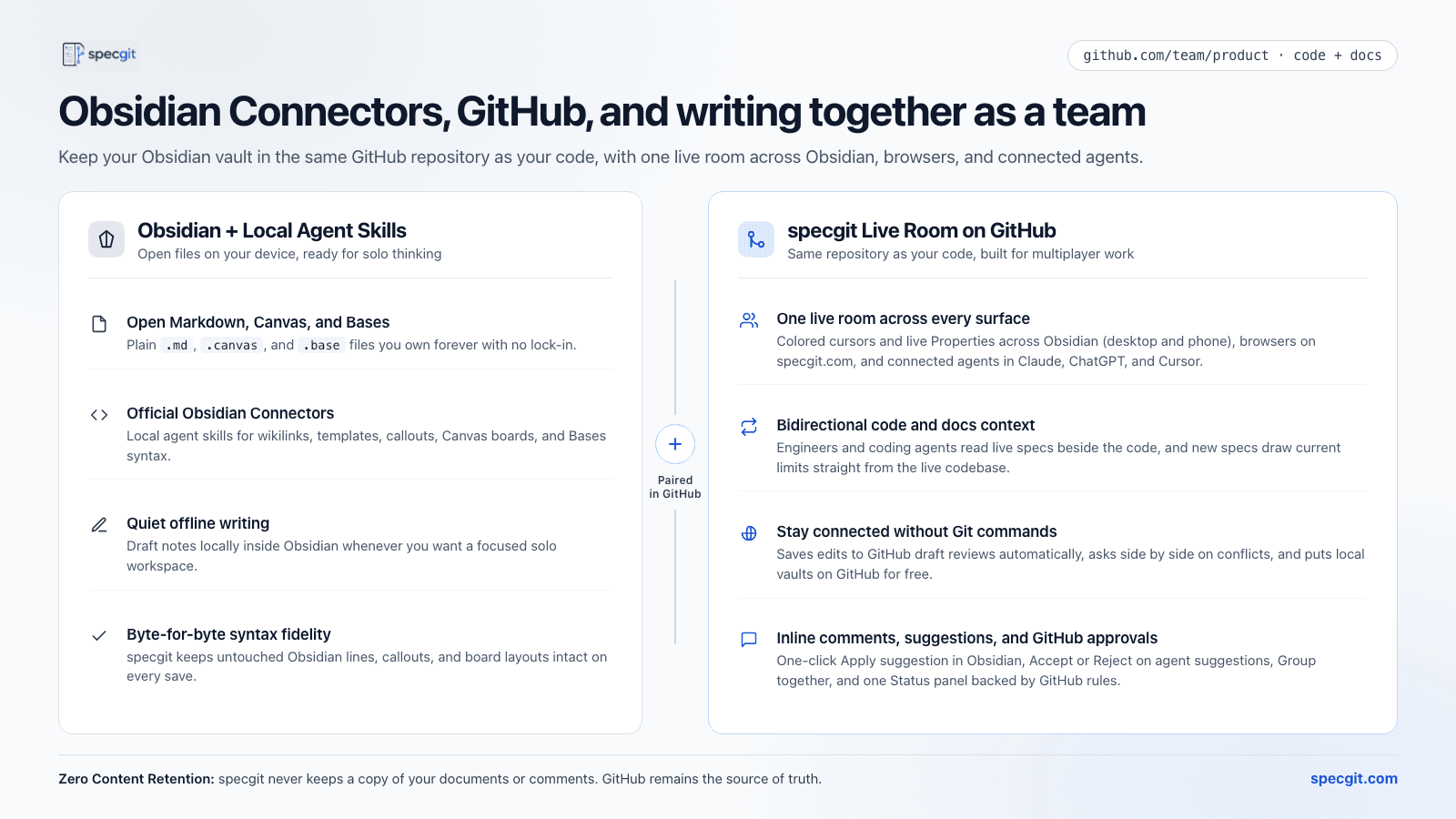
Bring your Obsidian vault and team together on GitHub
Install the free specgit plugin in Obsidian, connect your repository or put your local vault on GitHub for free, and collaborate live across Obsidian, browsers, and your own connected agents.
Free to start, no credit card. Zero Content Retention: we never keep a copy.
Install in Obsidian · Connect your agent · What is a holorepo?
Written context is no longer side paperwork for software teams. Product specs, design notes, customer research, decision records, and runbooks now sit directly behind what engineers and coding agents build every day.
That's why Obsidian's launch of official Obsidian Connectors for agents is such a welcome step for everyone who cares about open Markdown files. By publishing official skills for Claude, ChatGPT, Cursor, Hermes, GitHub Copilot, and other agents, Obsidian gave agents native fluency in wikilinks, templates, Canvas (visual boards of note cards and arrows), and Bases (Obsidian's database view files, stored as plain-text settings), using fewer tokens along the way.
We love Obsidian for the exact same reason so many writers and engineers do: your work stays in plain, durable files you own forever, with no lock-in. It's why we built the free, open-source MIT specgit for Obsidian plugin, test our Markdown and Canvas formatting on every change, and verify it against real Obsidian whenever we touch how files save.
For a team building software on GitHub, Obsidian's launch also spotlights two foundational choices that shape how well your docs hold up over time: where your team stores its knowledge, and how people and agents write, comment, and publish together.
Choice one: put your team's docs in the same GitHub repository as your code
Before picking a plugin or workflow, the people who write the context behind your software (product managers, designers, technical writers, researchers, and engineers) make one foundational decision: where those docs live.
If your team builds on GitHub, putting your Obsidian vault and team docs in the same repository as your code (a holorepo) pays off every week:
- Accuracy drift shrinks. When specs, research, handbooks, and launch plans live beside the code they describe, updates happen alongside product changes instead of drifting in a separate copy (how to add a docs vault to your code repo).
- Engineers and coding agents already have the context. Nobody copies paragraphs between apps or maintains a separate sync bridge. The latest spec sits right next to the files engineers and coding agents are editing.
- New docs can draw straight from the latest code. It works in both directions. When you're writing a spec for a new feature or updating a guide, the live code sits in the same repository. You can ask an agent to check how an existing feature works in the code today and what limits it has, then fold those exact answers into the doc you're writing (whether from a coding agent with the repo open or through specgit's built-in Repo context on Pro and Pro Plus).
- Docs inherit the controls your code relies on. In specgit, everyday actions like saving, commenting, and publishing connect straight to how GitHub works natively, via commits, pull request review threads (GitHub's name for a set of changes that goes to review together), and merges. That brings attributed history, audit trails, inline reviews, required approvals, and automated checks to every doc (on private repositories, branch protection and required-reviewer rules depend on your GitHub plan).
Obsidian Sync is designed to keep notes synced across your Obsidian devices and small Obsidian groups inside Obsidian's own ecosystem. When your team already runs on GitHub, doubling down on GitHub keeps code, docs, history, and reviews in one place, while letting everyone who loves Obsidian keep writing inside Obsidian.
How Obsidian and specgit fit together on GitHub
Looking at what each layer is built for shows how naturally they pair:
| Layer | Obsidian + Obsidian Connectors | specgit on top of your GitHub repo |
|---|---|---|
| Core home | Local-first Markdown vault on your devices, with optional Obsidian Sync across Obsidian devices. | Directly inside your GitHub repository, beside the code engineers and coding agents already work in. |
| Editing together | Local-first editing inside Obsidian. | Live collaboration rooms with colored cursors, live Properties (note metadata), and per-person undo across Obsidian (desktop and phone), browsers on specgit.com, and connected agents. |
| Mixed teams | Built for people working inside Obsidian. | Obsidian writers stay in Obsidian with the free MIT plugin; teammates who don't use Obsidian edit the exact same note or Canvas board in a browser. Viewing and commenting never use a seat. |
| Syncing with GitHub | Local files you can pair with Git, Obsidian Sync, or plugins. | Stay connected automatically saves edits to draft reviews in GitHub and brings in teammates' updates without anyone learning Git. Never publishes or deletes on its own. |
| Comments, suggestions, and review | Focused on writing and organizing notes, Canvas boards, and Bases. | Inline GitHub review threads anchored to exact words that carry across revisions, one-click Apply suggestion in Obsidian, Accept / Reject on agent suggestions, and one Status panel with Group together. |
| Connected agents | Official local skills for Obsidian formats and vault automation. | Connects over the web with your GitHub sign-in (no API keys), renders a live editor inside Claude, ChatGPT, and Cursor, and uses zero specgit agent usage. |
Choice two: docs are rarely a solo act
Solo thinking and personal research thrive in Obsidian's quiet local editor, and Obsidian's new Connectors make working with an agent on a local vault even smoother. The moment a note becomes shared team work (a product spec, launch plan, customer research synthesis, or handbook), a team needs a multiplayer workflow built on GitHub: live rooms, syncing without Git commands, inline comments, suggested edits, your own connected agents, and real publishing controls.
Picture a Tuesday afternoon before a launch review. You're a product lead updating a billing rollout spec in your team's GitHub repository.
You open the note in Obsidian on your laptop, open the specgit panel in the right sidebar, and select Connect Live. Across the team, your designer doesn't use Obsidian. They open the exact same note in a browser on specgit.com and tighten the rollout steps. You watch their colored cursor moving down the page inside Obsidian, and when they update the owner field in Properties (the metadata at the top of the note), it updates on your screen right away.
Meanwhile, a teammate has Cursor open with the codebase in front of them (the same live room works in Claude and ChatGPT too). Because Cursor connects to specgit's live room over MCP (Model Context Protocol, the open standard agents use to connect to outside apps), the live specgit editor opens right beside the code. They ask their agent to check how billing retries work in the live code today and what limits the code enforces, then propose wording updates for the rollout section. The agent proposes suggested edits that wait for a person. Your teammate clicks Accept on the phrasing they want inside the embedded editor card, and those code-checked details appear live in your Obsidian note.
Next, your engineering lead checks the draft in a browser and leaves an inline comment with a suggested wording fix on the rollback paragraph. Back in Obsidian, you open the Comments tab in the right sidebar, click the quote to jump to the underlined words, and select Apply suggestion. The paragraph updates in place, saves to your draft in GitHub, and resolves the thread.
When the draft looks right, you switch to the Status tab in the same sidebar, select Submit this note…, add your engineering lead as a reviewer, and select Submit. Your changes go to review as a pull request, and GitHub notifies your lead. They open the note in Obsidian on their phone, slide open the right drawer, check the changes, and tap Approve (or review on specgit.com or directly on GitHub). Your Status panel on desktop flips to Ready to publish without a reload, and clicking Publish merges the change into the version everyone sees.
Pairing Obsidian's skills with specgit's live rooms
Because Obsidian Connectors and specgit both work on plain Markdown, Canvas, and Bases files, they complement each other cleanly in the same repository.
Inside the free, open-source MIT specgit for Obsidian plugin, Stay connected handles the rest of your vault while live rooms cover the note you're typing in right now:
- Drafts stay separate from published notes. Saving puts edits on a draft review (a separate working copy, called a branch, in GitHub), never straight into the version everyone sees, and Stay connected never sends a delete on its own.
- Conflicts ask before overwriting. Edits in different paragraphs combine automatically; when two people change the same lines while disconnected, a conflict screen shows both versions side by side and waits for your choice.
- Untouched formatting stays byte for byte. Saving rewrites only the blocks you edited, keeping wikilinks, callouts, highlights, custom tasks, Canvas layout, and Bases settings intact (how we verify Obsidian syntax fidelity).
Your vault doesn't have to live in GitHub first. Choose Put this vault on GitHub in the plugin to create a private repository and upload your notes, Canvas boards, Bases files, attachments (up to 100 MB per file), and Obsidian settings for free. When an update spans several notes, Group together (Pro and Pro Plus) bundles them into one review and one publish from the same Status panel (how Group together works).
An engineer running a local coding agent can still use Obsidian's official skills so the agent writes clean callouts, Properties, and Bases formulas on disk, while specgit keeps every untouched line intact when teammates edit visually. And when you want an agent participating live beside teammates over the web, point Claude, ChatGPT, Cursor, VS Code, Gemini, or any remote MCP client at https://specgit.com/api/agent (read the full MCP walkthrough). You sign in with GitHub (no API keys to manage) and pick scope (Read documents, Read and comment, or Read, comment and edit) and duration (30 days, 90 days, or until removed). Read and comment access can't submit or publish; edit access can also submit for review or publish on documents you can open, and no tool can delete a file. Connected agents run on their host's own model and use zero specgit agent usage.
Getting started
specgit for Obsidian is free and open source under the MIT license, and Put this vault on GitHub is free on every plan. As of November 2026, the Free plan covers 1 repository, 5 publishes a month, unlimited collaborators, live rooms, inline comments, and MCP access to read documents, review, and comment. Pro is $8 per seat per month ($6.40 per seat per month billed annually, 20% off) for unlimited repositories, unlimited publishes, Group together, and full MCP access including the embedded live editor and agent editing. Pro Plus is $16 per seat per month ($12.80 per seat per month billed annually) and adds $10 per seat each month of built-in Ask Agent usage on specgit.com. Only editors use seats; viewing and commenting never do.
With Zero Content Retention, specgit never keeps a copy of your documents or comments. GitHub remains the source of truth. Read Privacy and Security for full details.
Plain Markdown files in Obsidian and a repository you control in GitHub share the same conviction: your team's thinking should stay open, durable, and yours. If your team builds on GitHub, double down on GitHub: keep the context beside the code, let people write in Obsidian, a browser, or their own connected agent, and give everyone a live room built to review and ship together.
Install in Obsidian · Connect your agent over MCP · Try specgit on a sample doc · See pricing
More from the blog
- Collaborate in real time, right from the comfort of your own agent
- Beyond GitBook Git Sync: why docs work better directly on GitHub
- Obsidian and 5 open-source alternatives: specgit supports all of them in GitHub
- How to add a documentation vault to your code repository (layout, .gitignore, attachments, and agent-ready Markdown)
- How to coordinate code releases, docs branches, and GitHub pull request rules when docs live beside code
- Introducing specgit for Obsidian: your whole team in your vault
- Now in specgit: Group together, one review for related docs
- Introducing Writing mode: a woodshed for your words
- Your Obsidian vault, edited together, exactly as you wrote it
- Introducing Canvas: your whole team on the board
- specgit is now available on Microsoft Marketplace
- User insights belong in the repo
- Why product specs go stale (and what keeps them current)
- Notion vs GitHub for product specs
- PRD chatbot vs docs in the repo
- All posts