Write the spec like a regular doc. Free to start, no credit card.
the specgit blog
Beyond GitBook Git Sync: why docs work better directly on GitHub
· the specgit team
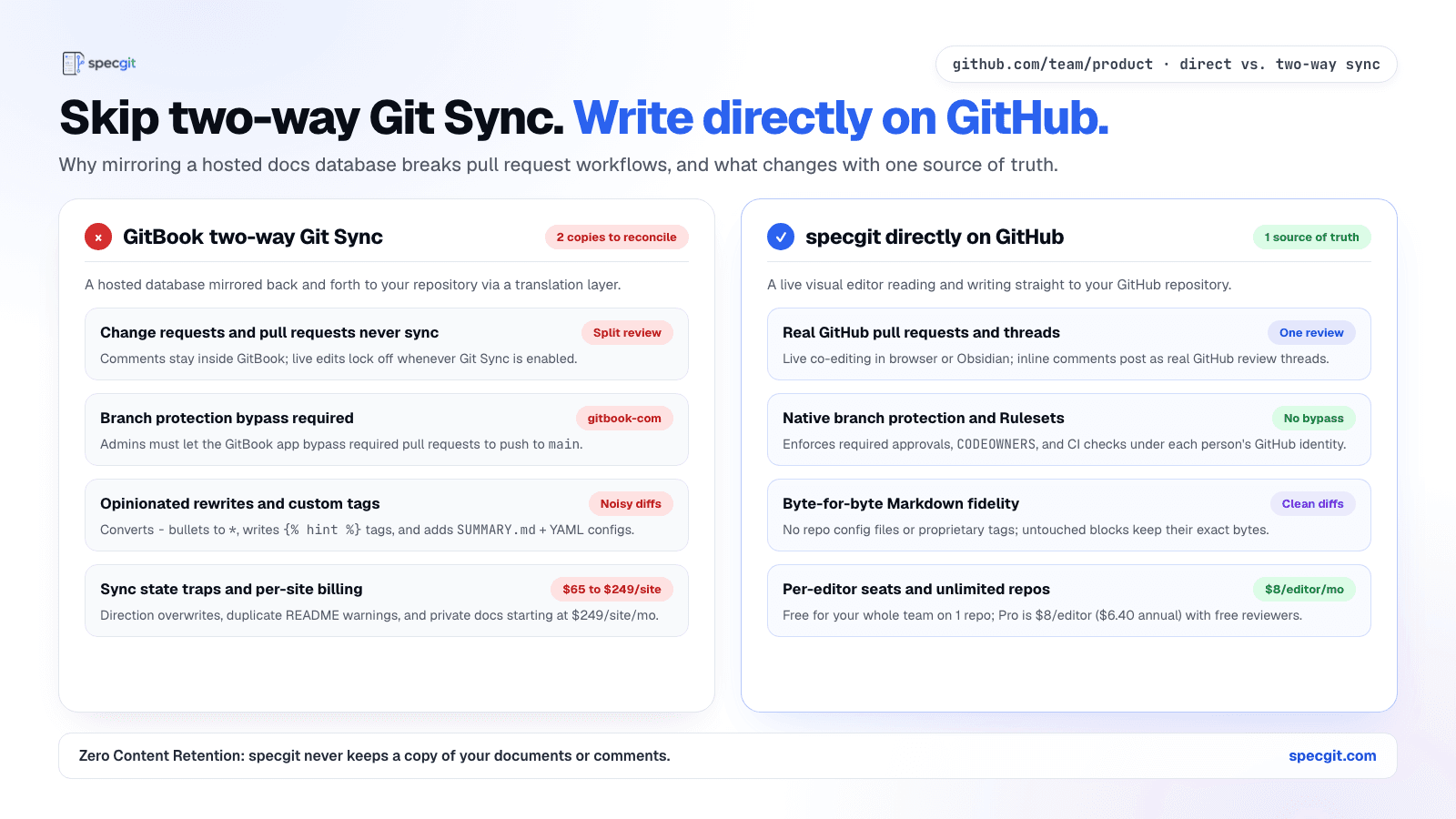
Skip the sync layer and write directly on GitHub
Open a repository in specgit, edit visually across browser, Obsidian, or connected agents, and keep GitHub as your sole source of truth. Free for your whole team on one repository.
Free to start, no credit card. Zero Content Retention: we never keep a copy.
GitBook's Git Sync page makes a pitch every engineering and product team wants to believe: engineers stay in GitHub editing Markdown, writers and product managers use a visual editor in GitBook, and a two-way sync keeps both copies identical.
In day-to-day use, teams keep running into the same walls. GitBook Change Requests and GitHub pull requests (GitHub's name for a set of changes that goes to review together) don't sync, and branch protection on main (the live version everyone sees) has to be bypassed so the GitBook app can push. A one-line edit comes back with rewritten list markers and custom template tags, while reconnecting a repository or renaming a space key can wipe a section or break cross-space links.
All of those problems stem from keeping a second copy of your documentation in a hosted database and running a sync job to mirror it back and forth with GitHub. When your visual editor works straight on GitHub instead, there's nothing left to sync.
Why two-way Git Sync breaks down by design
GitBook started as a hosted documentation platform. Its editor writes into GitBook's own block store, its review flow runs through GitBook Change Requests, its approval gates live in GitBook Merge Rules, and its comment threads sit inside GitBook.
Git Sync is a bridge bolted onto that model. When you edit in GitBook, the sync service serializes GitBook blocks into Markdown files and pushes commits to GitHub or GitLab. When an engineer pushes a commit to the repository, Git Sync parses the Markdown back into GitBook's internal blocks.
That round trip means your team now maintains two copies of the documentation, two review workflows, two permission systems, and a translation layer between them. specgit skips the database and the mirror. Regular document operations like saving, commenting, and publishing map straight to how GitHub works natively, via commits, pull request review threads, and merges.
Five places GitBook Git Sync fails teams (verified against GitBook's own docs)
Across technical-writing and developer forums, teams leaving GitBook Git Sync report the same recurring failure modes. Every limitation below is confirmed in GitBook's own documentation and public repositories as of November 2026.
1. Change requests and GitHub pull requests don't sync
GitBook's Git Sync feature page invites teams to "work with branches, reviews, and merges just like you do in your codebase." Yet GitBook's own Git Sync troubleshooting documentation answers the key question plainly: "Creating a pull request in GitHub or GitLab doesn't create a change request in GitBook, and creating a change request in GitBook doesn't create a pull request in your repository."
Two other constraints compound that split:
- Live co-editing locks off when Git Sync is active: Per GitBook's Live edits documentation, you can't unlock live editing on any section that has GitHub or GitLab Sync enabled. Every edit must go through a separate Change Request.
- Pull request previews require a GitBook account and fail on private sites: GitBook's GitHub pull request preview docs note that preview links are accessible only to people with a GitBook account, and previews are unavailable for sites published behind authenticated access.
In practice, engineers reviewing pull requests in GitHub and writers reviewing Change Requests in GitBook work in two separate rooms. Feedback posted on a Change Request stays inside GitBook until someone merges the whole Change Request and exports a commit (GITBOOK-14: ...).
How direct GitHub editing fixes it: In specgit, every edited document opens a real draft pull request automatically. Teammates co-edit live in a browser or inside Obsidian, and every inline comment is a real pull request review thread in GitHub that carries forward across publishes. An engineer can answer from GitHub or click into specgit, and both people stay in the same thread.
2. Git Sync asks you to bypass GitHub branch protection
Engineering teams protect main with required pull requests, CODEOWNERS, path-scoped Rulesets, and automated CI checks so unreviewed changes can't land in the repository (we documented the exact patterns in our guide to docs branches, CI, and pull request rules).
When you turn on GitBook Git Sync on a protected branch, pushes fail with Missing permissions to push to the refs/heads/main protected branch. GitBook's troubleshooting documentation gives the required fix: "Git Sync requires the GitBook app to push changes to your repository without restrictions, including during setup. Allow the GitBook app to bypass branch protections for the sync to work." Admins are told to add gitbook-com to the repository's branch protection bypass list.
Punching a bypass hole in main for an external SaaS app defeats the point of putting documentation under the same review controls as code. On repositories where branch protection or Rulesets are active (which require a paid GitHub plan on private repositories), specgit never asks for a bypass. Saves land on a review branch as commits under the author's own GitHub identity, the Status panel shows exactly what GitHub requires (Publishing needs 2 approving reviews: 1 so far.), reviewers approve under their own GitHub identity in specgit or GitHub, and Publish when approved merges through GitHub's normal rules once approvals and checks pass.
3. Opinionated Markdown rewrites and proprietary block syntax
Even when files do land in GitHub, GitBook's serializer rewrites them to match its own internal model. GitBook's public `GitbookIO/git-sync-normalization` repository states this upfront: "GitBook is opinionated... If your repository has markdown content that uses -, GitBook will change that to * during the synchronization that happens from GitBook to GitHub. If you add new content or change existing content to use markup that's not GitBook's flavor, GitBook will change it back at the next opportunity."
Rich blocks go further, serializing into proprietary template tags ({% hint style="warning" %}, {% tabs %}, {% stepper %}, {% embed %}) and raw HTML card tables, alongside up to three repository config files (gitbook-docs.yaml, .gitbook.yaml, and SUMMARY.md) plus .gitbook/assets/. Those noisy diffs and raw HTML conversions are why many engineering teams eventually turn off GitBook UI editing and treat GitBook as a read-only renderer.
Here is what a single number change looks like when a normalizing serializer rewrites surrounding bullets and callouts:
# Rate limits -## Standard tiers--- Free plan: 60 requests per minute-- Pro plan: 600 requests per minute+## Standard tiers++* Free plan: 60 requests per minute+* Pro plan: 1,200 requests per minute -> [!warning] Burst ceiling-> Exceeding the ceiling returns HTTP 429 with a Retry-After header.+{% hint style="warning" %}+Exceeding the ceiling returns HTTP 429 with a Retry-After header.+{% endhint %}Here is the exact same edit saved in specgit:
## Standard tiers - Free plan: 60 requests per minute-- Pro plan: 600 requests per minute+- Pro plan: 1,200 requests per minute > [!warning] Burst ceilingspecgit adds no config files or proprietary tags to your repository. It supports standard GitHub-flavored Markdown and Obsidian-flavored Markdown (wikilinks, callouts, highlights, math, Mermaid diagrams, YAML frontmatter, and Canvas boards), and writes every untouched block back byte for byte (how we test Markdown fidelity). Coding agents reading raw .md files in your repo see clean Markdown instead of template tags, and reviewers see a one-line diff for a one-line edit.
4. Sync state hazards: overwrites, duplicate READMEs, and permanent space keys
Every two-way mirror carries operational edge cases that disappear once there's only one copy. GitBook's own GitHub Sync setup, content configuration, monorepo, and troubleshooting docs document six recurring hazards:
- Reconnecting sync can overwrite your docs: Every time you set up or reconnect Git Sync, you pick an initial direction. Picking
GitHub -> GitBookwhen the branch lags behind recent Change Requests replaces the section's content, forcing manual rollbacks section by section in version history. - Creating
READMEfiles in the GitBook UI causes duplicates: GitBook warns that creating aREADMEfile in its editor while Git Sync is active generates duplicateREADMEfiles, causes rendering conflicts, and can break builds. - New files vanish unless listed in
SUMMARY.md: Once GitBook generatesSUMMARY.md, adding a new Markdown file in GitHub without registering it inSUMMARY.mdleaves the page invisible in GitBook. - Renaming a space
keyingitbook-docs.yamlpermanently breaks its ID: Changing a space'skeydetaches the original space, creates a brand-new space ID, breaks cross-space links and API calls, and restoring the original key creates yet another new space rather than undoing it. - Stuck syncs require dummy edits: When Git Sync hits an unexpected error, GitBook's documented recovery step is merging a small dummy word change in GitBook or GitHub to retrigger export or import.
- Monorepo spaces can't share assets: Each mapped directory is isolated, so images or files needed by two sibling spaces must be duplicated into each folder.
Without a sync layer, none of those states exist. Create a file in GitHub and it appears right away in specgit's folder tree. Rename a file in specgit and it executes a true Git rename that keeps commit history, open comment threads, and requested reviewers attached. When an engineer pushes a commit to main while a writer's draft is open, specgit merges non-overlapping edits block by block, flags when a review needs Catch up, and opens an in-editor conflict resolver only when both sides changed the exact same passage.
5. Two copies mean a wider trust boundary
Because GitBook is a hosted documentation platform, your pages, spaces, change requests, and integration credentials reside in GitBook's cloud database alongside the Git Sync connection.
On November 2, 2026, GitBook suffered a security incident in which an attacker forged staff sessions through an SSO login flaw and reached production infrastructure, prompting roughly 16 hours of downtime while GitBook rotated secrets and treated stored customer content, tokens, and Git Sync credentials as exposed (GitBook incident report, November 3, 2026). Any cloud service can face targeted attacks. The architectural question for private specs, architecture notes, and unreleased plans is whether an editing tool needs to hold a permanent copy of your documents and a branch-protection bypass token in the first place.
specgit is built around Zero Content Retention: specgit never keeps a copy of your documents or comments, and GitHub remains the source of truth. The only document or comment content that touches specgit servers is temporary: live-collaboration state deleted after publish or direct commit, or after 7 inactive days (swept daily, up to 8 days), user-invoked agent runs where model providers never train on inputs or outputs, and explicitly shared feedback, all documented on Privacy and Security. Access runs through the specgit GitHub App with fine-grained, repo-by-repo permissions and short-lived tokens.
What a real Tuesday update looks like without Git Sync
Picture a product team shipping a rate-limit update on Friday. Maya is the product manager, Sam is a technical writer working in Obsidian, and Priya is the staff engineer who owns the billing API.
On Tuesday morning, billing confirms the new Pro tier ceiling. Maya opens docs/rate-limits.md on specgit.com, where the document sits on the left and the Status panel sits on the right. At the same time, Sam opens the same file inside Obsidian with Connect Live turned on. Maya updates the Pro ceiling while watching Sam's colored cursor tidy the curl example two paragraphs down. Neither person opens a terminal, and neither has to wait for a sync job.
Because the same launch also touches docs/pricing-faq.md, Maya checks both files in the Status panel, clicks Group together, names the group Rate limit update, selects the Rate limit update group row, clicks Submit 2 documents…, adds Priya as a reviewer, and clicks Submit. Both files go out together as a single pull request in GitHub.
Priya gets a standard GitHub notification. She can review right on GitHub or follow the link into specgit. Opening Show changes in each doc highlights only what Maya changed in green and red, without reformatting a single bullet or adding template tags. Priya highlights a sentence on burst retries, leaves a comment that posts straight to the pull request thread, and clicks Approve under her own GitHub identity once Maya tweaks the wording. With Publish when approved switched on, GitHub merges the pull request the instant required approvals and ci-gate checks pass, the repository's existing docs build ships the updated page, and coding agents in the repo read the updated ceiling on the next checkout.
Pricing shape: per-site fees vs. per-editor seats
Cost is the other complaint that comes up again and again when teams outgrow GitBook, and it comes down to the billing axis more than any single tier. Verified against GitBook's pricing page and specgit pricing in November 2026:
- GitBook bills per published site plus per user: Free is limited to 1 user. Essential (formerly Premium) is $65 per site per month plus $12 per user per month billed annually ($79 per site plus $15 per user monthly) for public branded sites. Ultimate is $249 per site per month plus $12 per user per month billed annually ($299 per site plus $15 per user monthly), and is required for private authenticated access, GitBook Agent, and GitHub, Slack, or Linear channels. Git Sync IP allowlisting and SAML SSO sit on custom Enterprise plans.
- specgit bills per editing seat only, with unlimited repositories on paid plans: Free covers your whole team (unlimited collaborators) on 1 repository with 5 publishes per month, live visual editing, inline comments, Canvas boards, creative writing mode, the free open-source Obsidian plugin, and MCP access to read and comment. Pro is $8 per editing seat per month ($6.40 per seat per month billed annually, 20% off) with unlimited repositories, unlimited publishes, Group together, and full MCP editing in Claude, ChatGPT, and Cursor (running on your host's own model with zero specgit agent usage). Pro Plus is $16 per editing seat per month ($12.80 per seat per month billed annually) and includes $10 per seat per month of Ask Agent usage. Viewing and commenting never use a seat, so reviewing engineers cost $0.
Take a team of 5 editors (product managers, technical writers, and designers) and 10 engineers reviewing pull requests across 2 repositories (annual billing, November 2026):
| Scenario (5 editors, 10 reviewers, 2 repos) | GitBook (annual billing) | specgit Pro (annual billing) |
|---|---|---|
| Public docs only (2 sites / 2 repos) | Essential: 2 x $65 + 5 x $12 = $190/month (reviewers need GitBook accounts for pull request previews) | 5 editors x $6.40 = $32/month (unlimited repos, 10 reviewing engineers free) |
| Private or internal docs with authenticated access | Ultimate: 2 x $249 + 5 x $12 = $558/month (required for authenticated access and GitBook Agent) | 5 editors x $6.40 = $32/month (inherits your private GitHub repo permissions natively) |
| Free tier evaluation with a team | 1 user only (can't invite teammates on Free) | $0/month for unlimited collaborators on 1 repository (5 publishes/month) |
GitBook Git Sync vs. specgit at a glance
Both tools connect to GitHub, so you're choosing between a hosted platform synced to a repository and an editor that operates on the repository itself.
| Dimension | GitBook Git Sync | specgit |
|---|---|---|
| Architecture | Hosted GitBook database mirrored two ways with GitHub or GitLab | Direct visual editor on GitHub; Zero Content Retention (no copy kept) |
| Pull requests & comments | Change requests and GitHub pull requests don't sync; comments stay in GitBook | Every edited doc is a real GitHub pull request; inline comments are real pull request review threads |
| Branch protection & Rulesets | Requires allowing gitbook-com to bypass branch protection on protected branches | Enforces required approvals, CODEOWNERS, Rulesets, and CI checks natively with no bypasses |
| Markdown & diffs | Normalizes Markdown (for example - to *) and emits {% hint %} / {% tabs %} tags | Standard and Obsidian-flavored Markdown; untouched blocks preserved byte for byte |
| Repo boilerplate | Requires gitbook-docs.yaml, .gitbook.yaml, SUMMARY.md, and .gitbook/assets/ | No config files added to your repository |
| Where your team writes | GitBook web editor (live editing locked while Git Sync is enabled) | Browser, Obsidian (desktop and phone), and connected agents (Claude, ChatGPT, Cursor, and more via MCP) |
| Public docs hosting | Included: hosted site, theme, custom domain, and reader search out of the box | Not the renderer or host; publish merges to main and your existing pipeline (Docusaurus, MkDocs, VitePress, GitHub Pages, Vercel, Netlify) ships the site |
| Pricing (Nov 2026) | Free (1 user); Essential $65/site + $12/user/mo annual; Ultimate $249/site + $12/user/mo annual | Free (whole team, 1 repo, 5 publishes/mo); Pro $8/editor/mo ($6.40 annual); Pro Plus $16/editor/mo ($12.80 annual); viewers & commenters free |
When GitBook is still the right pick (and when to drop Git Sync)
Be honest about what you're buying. GitBook is a hosted documentation website builder, and it does that job well. If you need a public customer help center or interactive OpenAPI portal on a custom domain this week, have no static-site build pipeline, and don't want to maintain one, GitBook gives you a live website right out of the box because hosting, themes, and reader search come bundled.
If your documents belong in GitHub, the trade-off flips. That includes internal product specs, architecture decision records, runbooks, company handbooks, meeting notes, Obsidian vaults, and public documentation sites whose repository already deploys on merge through Docusaurus, MkDocs, VitePress, Next.js, GitHub Pages, Vercel, or Netlify. An empty GitHub repository is a fine starting point, and no prior Git experience is required: teammates can create docs from starter templates, upload Markdown or HTML, or import Word, PowerPoint, Excel, PDF, and Notion exports straight into clean Markdown.
Docs belong where the work lives. When your editor writes straight to GitHub instead of synchronizing a second copy, your writers get a calm visual editor, your engineers keep real pull request reviews and branch protection, and your Markdown stays yours. You can try specgit on a sample doc with no account, read our head-to-head specgit vs GitBook comparison, or connect one repository on the Free plan.
More from the blog
- Collaborate in real time, right from the comfort of your own agent
- Obsidian and 5 open-source alternatives: specgit supports all of them in GitHub
- How to add a documentation vault to your code repository (layout, .gitignore, attachments, and agent-ready Markdown)
- How to coordinate code releases, docs branches, and GitHub pull request rules when docs live beside code
- Introducing specgit for Obsidian: your whole team in your vault
- Now in specgit: Group together, one review for related docs
- Introducing Writing mode: a woodshed for your words
- Your Obsidian vault, edited together, exactly as you wrote it
- Introducing Canvas: your whole team on the board
- specgit is now available on Microsoft Marketplace
- User insights belong in the repo
- Why product specs go stale (and what keeps them current)
- Notion vs GitHub for product specs
- PRD chatbot vs docs in the repo
- All posts