Write the spec like a regular doc. Free to start, no credit card.
the specgit blog
Collaborate in real time, right from the comfort of your own agent
· the specgit team
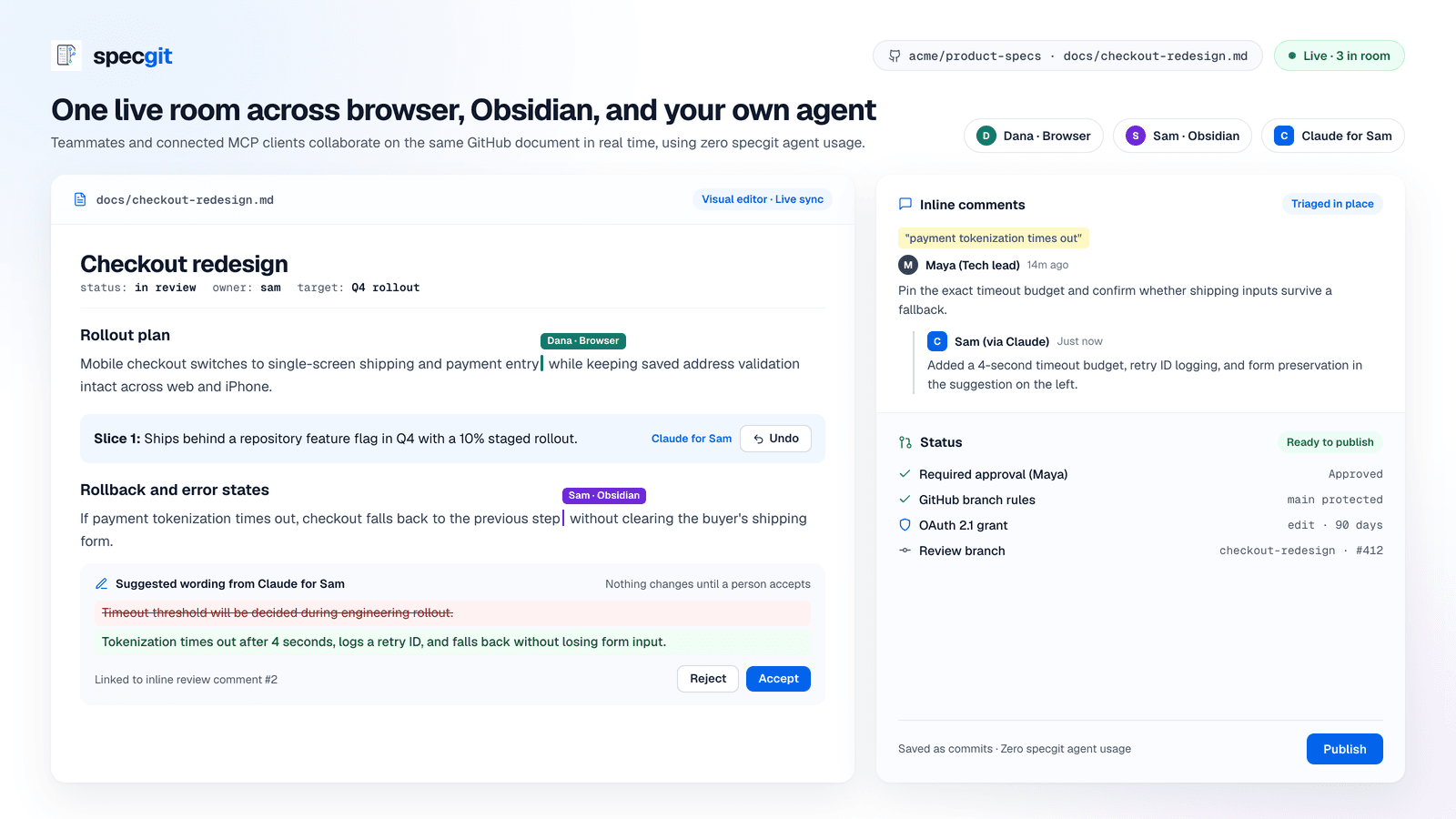
Join your team's live room from your favorite agent
Connect https://specgit.com/api/agent in Claude, ChatGPT, Cursor, or any MCP client, sign in with GitHub, and choose what it can do.
Free to start, no credit card. Zero Content Retention: we never keep a copy.
Connect your agent · Developer reference · See pricing
Plenty of tools can already read a Markdown file from GitHub or commit a change to a branch. GitHub has its own MCP server, and local coding agents have been editing files on disk for a long time. If all you want is an automated commit from a terminal, you already have ways to do that.
That is not why teams use specgit. What sets specgit apart from working in GitHub directly is our real-time live collaboration rooms: colleagues open the same GitHub document or Obsidian Canvas board together, edit visually with live cursors, leave inline comments on exact words, and handle the entire review and publishing flow without leaving specgit. Your repository stays the source of truth, and nobody has to untangle raw Markdown diffs or juggle Git commands.
Inside specgit, our built-in Ask Agent already works inside those live rooms and can do everything human teammates can do: read the live draft, edit or suggest wording, answer inline comments, run a review, rearrange a Canvas board, and help move a document toward publish. Now we are extending that exact live room straight to your own agent tools over MCP (Model Context Protocol, the open standard agents use to connect to external apps).
With the specgit MCP server at https://specgit.com/api/agent, you can collaborate with your team in real time right from the comfort of Claude, ChatGPT, Cursor, VS Code, Gemini, Grok, or any MCP client. Your teammates keep writing in a browser on specgit.com or inside Obsidian on desktop and phone. You stay in the agent tool you already have open. Everyone works in the same live room, there are no API keys to manage, and connected agents use zero specgit agent usage because they run on their host's own model.
What real-time collaboration from your agent looks like
Say you are a product manager preparing a checkout redesign spec for Thursday's engineering review. On Wednesday afternoon, your designer is already in the browser on specgit.com tightening the mobile flow, a writer is checking notes in Obsidian, and your tech lead has left three inline comments in the right sidebar asking about rollback behavior and error states.
You already have Claude open (or ChatGPT or Cursor) with your customer interview notes in the thread. Instead of copying paragraphs back and forth or editing an out-of-date copy on disk, you ask Claude to open docs/checkout-redesign.md. Because Claude, ChatGPT, and Cursor support MCP Apps (the extension that lets a connected app render its own interface inside a chat), the live specgit editor opens right in your conversation. You see the live document, your designer's colored cursor moving through section two, and your connected agent listed in the room as an agent working for you.
From there, your agent can participate in the document the way a teammate does:
- Triage comments in place: Ask the agent to go through the open comments. It calls
start_triage, reads every open thread in document order, replies under your GitHub name, and puts a suggested wording change beside each paragraph that needs an update. Nothing in the document changes yet. In the embedded editor card, you click Accept on the rollback paragraph and Reject on a phrasing tweak you disagree with. - Edit live beside teammates: Ask the agent to update the Slice 1 milestone line directly. The edit lands in real time right in front of your designer, and the card keeps a one-click Undo button if you want to take it back.
- Manage publishing without leaving the room: When the draft looks right, ask the agent to get the spec ready to publish. specgit saves the latest live edits to GitHub (each save is an ordinary commit on a review branch) and opens the status card with the Submit for review or Publish button. Your tech lead gets a GitHub notification, reads the pull request (GitHub's name for a set of changes that goes to review together) in specgit or directly on GitHub, and approves. Your repository's branch protection and required-review rules apply the same way they do for code.
Embedded live editor or direct specgit links
Not every MCP host renders interactive apps inside a conversation yet, so specgit adapts to each host while keeping the exact same live rooms underneath.
| Host | Setup path | In-chat live editor | What you can do in the room |
|---|---|---|---|
| Claude (web, desktop, Claude Code) | Custom connector or claude mcp add | Yes (web and desktop) | Read live text, edit, suggest, comment, review, triage, boards, Bases |
| ChatGPT (web and iPhone) | Custom connector / Plugin | Yes | Read live text, edit, suggest, comment, review, triage, boards, Bases |
| Cursor | One-click install link or mcp.json | Yes | Read live text, edit, suggest, comment, review, triage, boards, Bases |
| VS Code | One-click install link or .vscode/mcp.json | Links to specgit.com | Read live text, edit, suggest, comment, review, triage, boards, Bases |
| Gemini and Grok | Custom MCP connector | Links to specgit.com | Read live text, edit, suggest, comment, review, triage, boards, Bases |
| Windsurf and other MCP clients | Streamable HTTP (https://specgit.com/api/agent) | Links to specgit.com | Read live text, edit, suggest, comment, review, triage, boards, Bases |
In Claude, ChatGPT, and Cursor, the embedded editor shows the live document, active teammates, one-click Undo on direct edits, Accept and Reject on suggestions, and a full-screen view for comments and the Status panel. In hosts that do not draw an editor, every tool result carries a direct link to the document on specgit.com, where you can review changes, accept suggestions, or publish with one click.
Docs, Obsidian Canvas boards, and Obsidian Bases
Real team rooms hold more than plain Markdown notes, so your connected agents work across three file types:
- Markdown documents (
.md,.markdown): Read live text including unsaved edits teammates are typing right now, replace a passage (edit), rewrite a section under one heading (edit_section), insert new content (insert), propose wording with Accept and Reject (suggest_edit,suggest_section), create or rename files, and add images from a web address or uploaded file. - Obsidian Canvas boards (
.canvas): Read every lane, card, arrow, and note title in reading order, then update the live board throughboard_change(adding cards, converting text cards to notes, connecting arrows, grouping, and tidying lanes) with one Undo for the whole step. - Obsidian Bases (
.base): Read and edit.baseYAML settings files, saving valid YAML directly to the review draft on GitHub.
What you allow, and what stays your decision
Inviting an outside agent into your team's live rooms should never mean handing over a permanent personal access token with wide repo permissions. specgit uses OAuth 2.1 with PKCE and automatic discovery, so there are no API keys to create or rotate.
When you connect an agent, you sign in with your own GitHub account through the specgit GitHub App, then see a consent page that names the agent and asks two clear questions:
- What it can do: Read documents (
docs:read), Read and comment (docs:comment), or Read, comment and edit (docs:edit), depending on what the host asks for. When a host asks for edit access, you can limit it to Read and comment right on the consent page. - How long it lasts: 30 days, 90 days, or Until I remove it.
From there, the rules stay concrete:
- Your GitHub permissions are the ceiling. The agent acts as you, only in repositories where the specgit GitHub App is installed and you already have access. Changing a document still requires push access to that repository.
- Read and comment grants cannot submit or publish. With an edit grant, the agent can open the submit or publish card, and an edit grant can also submit for review or publish on documents you can open. GitHub's branch protection and required-review rules still apply every time.
- Suggestions wait for a person. Only a person can accept or reject a suggested edit.
- No tool deletes a file. Creating a new file always starts a draft review on its own branch, never directly on the published version.
- Revoke any time. Pause an agent from inside a document, or remove it at any time in Settings → Connected agents. Access stops right away.
Ask Agent vs. your own connected agents
Both sit in the same live rooms and follow the same GitHub review workflow, so choosing between them comes down to where you want to work.
Built-in Ask Agent lives inside the specgit editor with one-click Review, Triage, Writing mode, voice sessions, and Repo context across your files. By default, every change Ask Agent proposes waits as an approval card before anything changes, and your content goes only to specgit's model providers under our documented commercial terms.
Connecting your own agent over MCP shines when you already live inside Claude, ChatGPT, or Cursor, when you want to combine your team's live GitHub docs with other tools in that workspace (research notes, issue trackers, or local code), or when you want to use the model subscription you already pay for. The honest trade-off is privacy scope: what an outside agent reads through specgit's tools is processed by that agent's provider (Anthropic, OpenAI, Cursor, Google, or xAI) under your own agreement with them. Inside hosts that render the embedded editor, document text flows directly between the embedded editor and specgit, and the host's model sees only what specgit's tools return plus any short passage you explicitly send from the editor.
On specgit's side, Zero Content Retention holds for connected agents too: specgit never keeps a copy of your documents or comments. Temporary live collaboration state (including the undo record for an agent's edits) is deleted after publish or direct commit, or after 7 inactive days (swept daily, up to 8 days). Connection records hold metadata only (which agent, permission level, timestamps) and are deleted 30 days after a connection ends.
Plans and zero specgit agent usage
Reading documents, reviewing them, and posting comments through MCP work on every plan, including the Free plan (1 repository, 5 publishes a month, unlimited collaborators, no credit card).
Opening the embedded live editor and editing documents or boards through MCP require the repository's owner to be on Pro ($8 per seat per month) or Pro Plus ($16 per seat per month; annual billing saves 20%). People can still edit in specgit on every plan.
Because connected agents run on their host's own model, MCP calls use zero specgit agent usage. You do not spend Ask Agent tokens or Pro Plus monthly agent allowance when Claude, ChatGPT, or Cursor collaborates with your team.
How to connect your agent
Every MCP host points at the same address:
https://specgit.com/api/agent- Claude (web and desktop): Open Customize → Connectors, add a custom connector pointing to
https://specgit.com/api/agent, choose Connect, and sign in with GitHub. - Claude Code: Run
claude mcp add --transport http specgit https://specgit.com/api/agentand complete the browser sign-in. - ChatGPT: Enable developer mode in settings, add a custom connector with
https://specgit.com/api/agentand OAuth sign-in, and connect. - Cursor: Use the one-click install link on /developers, or add
{"mcpServers": {"specgit": {"url": "https://specgit.com/api/agent"}}}to~/.cursor/mcp.json. - VS Code: Use the one-click install link on /developers, or add
{"servers": {"specgit": {"type": "http", "url": "https://specgit.com/api/agent"}}}to.vscode/mcp.json. - Gemini, Grok, and other MCP clients: Add
https://specgit.com/api/agentas a remote Streamable HTTP MCP server. Clients that support OAuth discovery complete sign-in automatically; custom clients can follow /auth.md.
The official MCP Registry entry is live under com.specgit/docs-agent, and our public setup guides and connector manifest live in github.com/fnfirst/specgit-mcp.
GitHub is the right home for your team's docs, and real-time rooms are what make working there feel like a modern doc tool. Now everyone on the team can join the same live room from a browser, from Obsidian, or right from the comfort of their own agent.
See the MCP overview · Read the developer reference · See pricing
More from the blog
- Beyond GitBook Git Sync: why docs work better directly on GitHub
- Obsidian and 5 open-source alternatives: specgit supports all of them in GitHub
- How to add a documentation vault to your code repository (layout, .gitignore, attachments, and agent-ready Markdown)
- How to coordinate code releases, docs branches, and GitHub pull request rules when docs live beside code
- Introducing specgit for Obsidian: your whole team in your vault
- Now in specgit: Group together, one review for related docs
- Introducing Writing mode: a woodshed for your words
- Your Obsidian vault, edited together, exactly as you wrote it
- Introducing Canvas: your whole team on the board
- specgit is now available on Microsoft Marketplace
- User insights belong in the repo
- Why product specs go stale (and what keeps them current)
- Notion vs GitHub for product specs
- PRD chatbot vs docs in the repo
- All posts