Write the spec like a regular doc. Free to start, no credit card.
By continuing, you agree to the Terms of Use and acknowledge the Privacy Policy. Analytics choices are separate.
the specgit blog
How to coordinate code releases, docs branches, and GitHub pull request rules when docs live beside code
· the specgit team
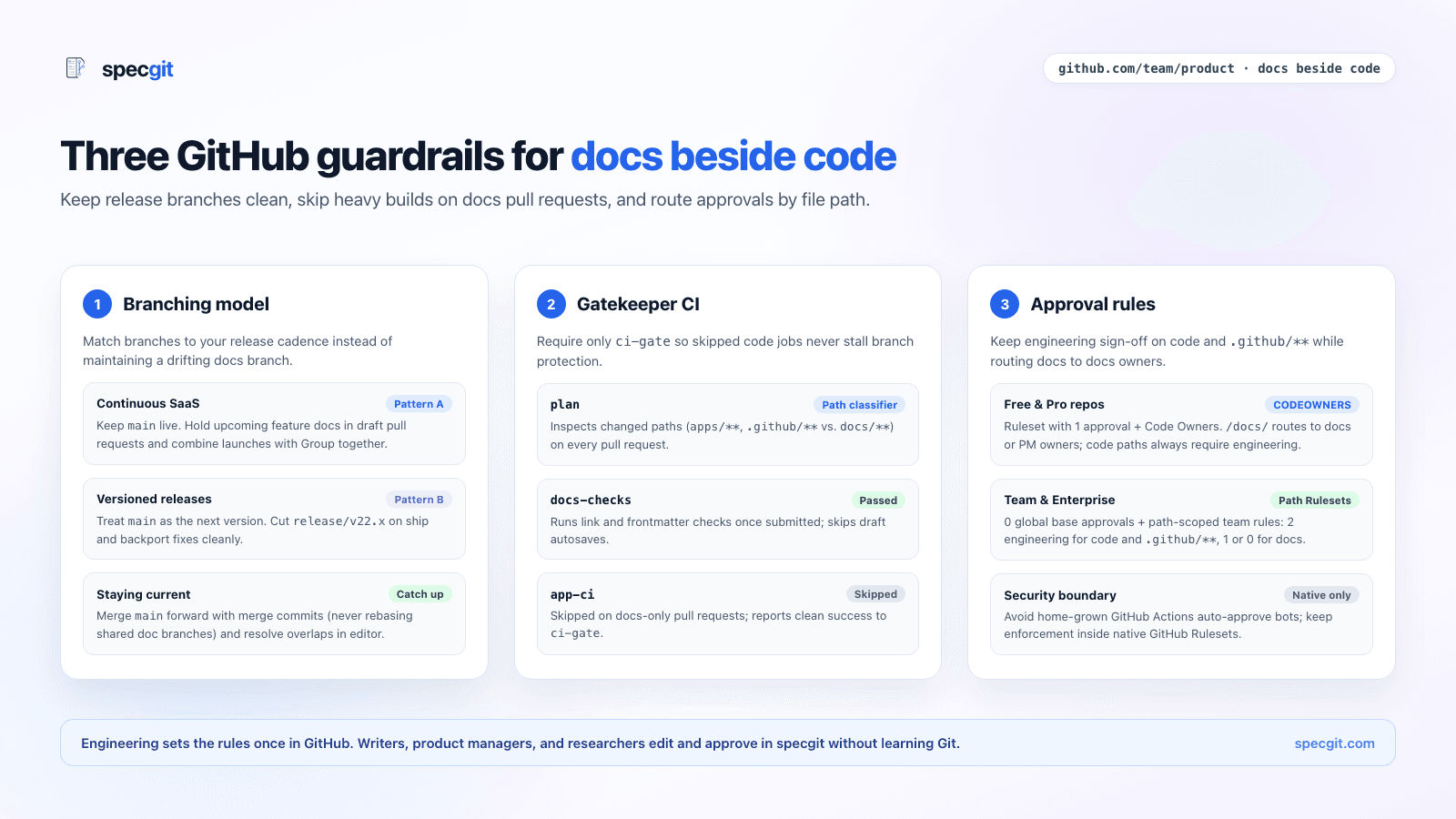
Keep docs beside code without the friction
Set your branch model, ci-gate workflow, and approval rules once in GitHub, and let the whole team edit and review in specgit.
By continuing, you agree to the Terms of Use and acknowledge the Privacy Policy. Analytics choices are separate.
See plans & pricingFree to start, no credit card. Zero Content Retention: we never keep a copy.
Putting product specs, architecture notes, and user documentation in the same GitHub repository as your application code solves one of the hardest problems in software engineering: keeping written context current as the codebase changes.
It also forces engineering teams to answer three practical questions on day one:
1. How should documentation branches follow code releases without turning into a long-lived merge nightmare?
2. How do docs-only pull requests skip slow application CI suites without stalling GitHub Required Status Checks?
3. How do you give documentation lighter pull request approval rules than production code without opening a security hole?
Below are the proven patterns, honest trade-offs, and GitHub Free, Pro, Team, and Enterprise configurations engineering teams rely on. These are the same practices specgit uses ourselves to keep documentation and product specs moving right beside application code.
1. Pick the right branching model for your release cadence
Most teams walk into the same trap first: v22 just shipped, engineering starts two months of work on v23, and someone creates a long-lived docs/v23 branch so writers can document features as they go.
Within weeks, main and docs/v23 drift apart. Every typo fix or hotfix has to be applied twice, file renames trigger ugly conflicts, and release day turns into a multi-hour rebase.
Use one of two cleaner models depending on how you ship:
Pattern A: Unversioned SaaS docs (hold feature docs on draft pull requests)
If your product ships continuously and you maintain one current set of documentation:
- Keep
mainequal to what is live in production today. - Open a draft pull request for each upcoming feature's doc updates while engineering builds the feature.
- Writers, product managers, and engineers collaborate on the draft and inspect preview builds.
- When the feature ships, merge the pull request. If one launch touches several documents, group them into a single pull request so they review and publish together.
Trade-off (staying fresh with main): Draft pull requests that stay open for more than a few weeks fall behind as other teammates publish unrelated fixes to main. Keeping a long-lived draft current means periodically pulling newer commits from main forward into your draft branch with a merge commit (in Git, running git merge main on the draft branch or clicking Update branch on GitHub). That merge adds main's newer changes onto your branch while preserving commit history and only asking you to resolve lines where both sides edited the same text. Avoid git rebase on shared doc branches: rebasing rewrites commit history, breaks open review-comment anchors, and can re-trigger reviewer notifications on untouched files.
How specgit helps on Pattern A
- Every edited document opens its own draft pull request automatically: When a writer or product manager edits a document in specgit (in the browser or inside Obsidian), specgit saves their work to a dedicated review branch and draft pull request automatically, so upcoming feature docs stay isolated from
mainwith no terminal commands. - Combine related drafts with Group together: Because each edited document starts in its own draft pull request, a launch that touches four files (such as pricing, FAQ, help guide, and release notes) starts as four drafts. On Pro and Pro Plus, check those files in the shared Status panel and click Group together to combine them into one shared pull request. Reviewers get one notification, read every file together, approve once, and publish the entire launch in one merge (counted as one publish). Each file keeps its own draft until you publish, so you can add files, take one out, or ungroup without losing edits.
- Merge
maincleanly with Catch up (no rebasing): Draft pull requests still need to pull in newer edits whenmainmoves underneath them. When a file changes onmainwhile your review is open, specgit flags that the review is behind and offers Catch up with main, which bringsmain's changes into your review branch using a clean merge commit (never rebasing history). Non-overlapping changes merge automatically block by block; if both sides edited the same passage, the in-editor conflict resolver lets you pick yours, theirs, both, or custom text directly in the editor. For grouped reviews, if a member file changed onmain, the group holds and lets you resolve it cleanly before anything publishes.
Pattern B: Versioned releases (trunk-based main with release branches)
If you support multiple shipped versions (v22, v23, enterprise LTS):
- Flip the mental model:
mainis always the next unreleased version (v23). Merge feature docs intomainas features land and deploymainto an internal staging preview. - When
v22ships, cut a release branch (release/v22.x) frommain. That branch never merges back intomain. - When a hotfix applies to a shipped version, land the fix on
mainfirst, then cherry-pick or backport it torelease/v22.x.
How specgit helps on Pattern B
- Switch between
mainand release branches in one dropdown: Once engineering cuts a release branch such asrelease/v22.x, writers and product managers select it from the branch switcher on specgit.com and work against that branch with the exact same draft pull request, Group together, and Catch up workflow. No one has to check out branches locally to fix a doc on an older supported release. - Cross-branch edit awareness: If someone opens a document on
mainwhile a teammate already has an unpublished draft or open pull request modifying that file on another branch, specgit surfaces a branch awareness banner (CompareorEdit in that branch) so people do not silently write conflicting versions in parallel. - Clear division of labor: Engineering (or a coding agent) still handles cutting
release/v22.xbranches and cherry-picking code-plus-docs hotfix commits across branches; everyone else edits and reviews docs on any active branch directly inside specgit.
Branch-based vs. directory-based versioning
| Approach | Strengths | Trade-offs |
|---|---|---|
Branch-based (main, release/v22.x) | Mirrors code release branches cleanly; keeps the working tree small; avoids search index clutter across old versions. | Hotfixes require backporting across branches (though coding agents make backport pull requests much lighter than they used to be). |
Directory-based (docs/v22/, docs/v23/) | Easy to browse and diff versions side by side; zero cherry-picking; straightforward shared assets. | Larger repository tree; naive internal search indexers and coding agents will cite deprecated folders unless you document the canonical current path clearly in AGENTS.md. |
2. Same repository vs. separate docs repository: what changed
Ten years ago, mature engineering organizations split docs into a separate repository for one reason: a one-word typo fix triggered a 20-minute application build and test pipeline.
Two shifts flipped that math:
- Path-scoped CI pipelines: Modern GitHub Actions workflows inspect the changed file list up front, run only lightweight doc checks (link validation, frontmatter checks, Markdown lint) on docs-only pull requests, and skip application builds cleanly.
- Coding agents: When specs, decision records, and user guides live beside
src/, coding agents read product intent alongside the code in one checkout and draft doc updates inside the same pull request instead of letting a separate docs repository drift out of date silently.
If your docs describe one product or monorepo, collocating them next to code is usually the stronger default.
A separate repository still makes sense for company-wide handbooks, security policies, or cross-product documentation spanning dozens of unrelated services (and that shared GitHub repository can still be edited by the whole team in specgit). When you split those shared docs out, place a short pointer document in each service repository (for example, docs/company-docs.md or a dedicated section in AGENTS.md) that links directly to the canonical shared repository and names which topics live there. That small pointer stops two recurring headaches: teammates writing stale local copies because they could not find the official handbook, and coding agents creating duplicate or conflicting policy docs inside individual service repositories.
3. Letting docs-only pull requests bypass heavy CI/CD (without stalling branch protection)
The GitHub Actions trap to avoid
If you add a top-level paths: or paths-ignore: filter to a workflow that is marked as a Required Status Check on main, GitHub will never trigger that workflow on a docs-only pull request. The required check stays stuck in Expected - Waiting for status to be reported forever, blocking the merge button.
GitHub treats a skipped workflow as never reported, whereas a job skipped via if: inside a triggered workflow reports success.
Option 1: The Gatekeeper pattern (plan + ci-gate) (recommended for any protected repo)
This works identically on GitHub Free (public), Pro, Team, and Enterprise whenever you enforce Required Status Checks or Merge Queues:
- Trigger the workflow on
pull_request(opened,synchronize,reopened,ready_for_review) andmerge_group, with no top-levelpaths:filter. - Run a small
planjob to classify whether the pull request touches code or configuration (apps/**,packages/**,Dockerfile, lockfiles, and always.github/**). - Gate heavy application jobs on both
!github.event.pull_request.draftandneeds.plan.outputs.code == 'true' || github.event_name == 'merge_group'. - Run only lightweight docs checks (broken-link validation such as Lychee, YAML frontmatter checks) when
docs == 'true', skipping the application build and test suite. - End with a single aggregator job (
ci-gate) usingif: always()that fails only if a job that actually ran failed. - In GitHub branch protection or Rulesets, require only
ci-gate(never individual matrix shards or conditional jobs).
name: ci on: pull_request: branches: [main] types: [opened, synchronize, reopened, ready_for_review] merge_group: concurrency: group: ci-${{ github.event.pull_request.number || github.ref }} cancel-in-progress: true permissions: contents: read pull-requests: read jobs: plan: runs-on: ubuntu-latest outputs: code: ${{ steps.filter.outputs.code }} docs: ${{ steps.filter.outputs.docs }} steps: - uses: actions/checkout@v4 with: fetch-depth: 2 - id: filter uses: dorny/paths-filter@v3 with: filters: | code: - 'apps/**' - 'packages/**' - 'services/**' - 'Dockerfile' - 'package.json' - 'pnpm-lock.yaml' - '.github/**' docs: - 'docs/**' - 'specs/**' - '**.md' docs-checks: needs: plan if: (!github.event.pull_request.draft) && needs.plan.outputs.docs == 'true' runs-on: ubuntu-latest steps: - uses: actions/checkout@v4 - name: Check Markdown links uses: lycheeverse/lychee-action@v2 with: args: --no-progress 'docs/**/*.md' 'specs/**/*.md' app-ci: needs: plan if: (!github.event.pull_request.draft) && (needs.plan.outputs.code == 'true' || github.event_name == 'merge_group') runs-on: ubuntu-latest steps: - uses: actions/checkout@v4 - name: Typecheck, test, and build run: pnpm verify ci-gate: needs: [plan, docs-checks, app-ci] if: always() runs-on: ubuntu-latest steps: - name: Verify required results run: | for res in "${{ needs.plan.result }}" "${{ needs.docs-checks.result }}" "${{ needs.app-ci.result }}"; do if [ "$res" != "success" ] && [ "$res" != "skipped" ]; then echo "Upstream check failed: $res" exit 1 fi doneWhy !github.event.pull_request.draft matters for live writing tools: Tools that autosave drafts to a GitHub review branch (including specgit) push commits while people write. Skipping heavy jobs while the pull request is in draft mode and canceling superseded runs with concurrency keeps runner bills near zero, then triggers full validation the instant someone clicks Submit for review (ready_for_review).
Security detail: Always include .github/** inside the code path filter. That ensures a contributor cannot alter CI workflow files inside a pull request that also edits a Markdown file and slip past application checks.
Option 2: Top-level on.pull_request.paths allowlist (lean teams without Required Status Checks)
If your repository does not enforce Required Status Checks on main (for example, a small private repo on GitHub Free, or a non-blocking secondary test workflow), putting paths: directly on on.pull_request eliminates even the lightweight plan job on docs-only pull requests. Pair it with on: push: branches: [main] for any deploy or content-sync jobs so review-branch autosaves never kick off builds.
Option 3: Dedicated Merge Queue and policy tools (Mergify, Nx, Turborepo)
Once a monorepo passes roughly 50 engineers with heavy Merge Queue contention, managed orchestrators like Mergify can compute path-scoped required checks and queue batches natively. Most teams do not need that extra vendor layer until Gatekeeper outgrows a single workflow file.
4. Lighter GitHub pull request approval rules for docs vs. code (Free, Pro, and Paid plans)
Engineering teams want two things at once: production code changes (apps/, packages/, .github/) should require engineering sign-off, while typos, specs, and docs (docs/, specs/) should route to docs or product owners without blocking engineers.
Every approval setup also has to defeat the "Trojan documentation pull request" vector: a pull request that edits docs/getting-started.md alongside a hidden change in apps/api/auth.ts or .github/workflows/deploy.yml.
Recommended for GitHub Free (public) & GitHub Pro (private): .github/CODEOWNERS + Ruleset
GitHub Pro unlocks Branch Protection and Repository Rulesets on private personal repositories (and GitHub Free includes them on public repositories). Because personal repos do not have organization teams, map folder ownership directly to GitHub usernames in .github/CODEOWNERS:
# Default code and CI ownership (evaluated top-to-bottom; last match wins)* @eng-lead-1 @eng-lead-2/.github/ @eng-lead-1 @eng-lead-2 # Documentation and product specs route to docs/product owners/docs/ @docs-owner @pm-lead/specs/ @pm-lead @docs-ownerIn Settings > Rules > Rulesets, create a branch ruleset targeting main:
- Enable Require a pull request before merging with 1 required approval and Require review from Code Owners checked.
- Enable Require status checks to pass and add only
ci-gate. - Enable Require conversation resolution before merging so open review threads cannot be overlooked.
How it behaves: A docs-only pull request requests review only from @docs-owner or @pm-lead (never pinging engineers) and runs only the lightweight doc checks before clearing ci-gate. If that pull request touches even one line under apps/ or .github/, GitHub automatically requires approval from @eng-lead-1 or @eng-lead-2 too.
Trade-off: Every pull request into main still requires at least 1 approval. You cannot set 2 approvals for code and 0 approvals for docs on Free or Pro without a third-party app.
Recommended for GitHub Team & Enterprise organizations: Path-scoped Required Reviewers in Rulesets
On GitHub Team ($4/user/month) and GitHub Enterprise (for both private and public org repositories), GitHub Rulesets natively support Required review from specific teams tied to file patterns:
- Create a branch ruleset on
mainand enable Require a pull request before merging. - Set the global base Required approvals count to
0. - Under Required review by specific teams, add distinct path-scoped rules (up to 15 teams per rule):
apps/**,packages/**,services/**,.github/**,deploy/**-> 2 approvals from@org/engineering; anddocs/**,specs/**-> 1 approval from@org/docs-owners(or 0 if trusted writers may self-publish docs while still keeping a clean pull request audit trail andci-gatelink check). - Keep
.github/CODEOWNERSin the repository for automatic reviewer suggestions and clear visibility.
Important prerequisite: For a team member's approval to count toward a Ruleset requirement, that team must have Write permission (or higher) on the repository.
Why this is the strongest paid-plan option: It is native to GitHub, requires zero third-party apps or bot tokens, allows asymmetric counts (2 for code, 1 or 0 for docs), and stays completely immune to Trojan documentation pull requests because matching any code pattern triggers the full engineering threshold.
Optional for nuanced auto-approval policies: gitStream or Mergify
If your organization wants conditional rules GitHub Rulesets do not express natively (for example, auto-approving docs edits under 20 lines by established contributors while requiring a docs lead for structural rewrites), declarative engines like gitStream or Mergify evaluate strict 100%-subset file matches outside untrusted pull request workflow runs. The trade-off is adding and auditing an external GitHub App.
What to avoid: home-grown GitHub Actions auto-approve bots
Many teams are tempted to write a custom GitHub Action with pull-requests: write (or a Ruleset bypass token) that checks changed file paths and calls the GitHub API to auto-approve docs pull requests.
Avoid this pattern unless dedicated platform security engineers own it:
- Privilege escalation risk: Granting a pull-request-triggered workflow token approval or bypass rights creates a high-value target if path matching has any regex edge case or workflow-injection flaw.
- Strict-subset bugs: Hand-rolled shell scripts frequently check whether any changed file matches
docs/**instead of proving every changed file matchesdocs/**. - Merge Queue friction: Native GitHub auto-merge and Merge Queues often stall around workflow-actor Ruleset bypasses, turning a convenience script into recurring maintenance work.
5. Summary comparison: choosing your setup
| GitHub Plan | Recommended CI Setup | Recommended Approval Setup | Docs Pull Request Experience |
|---|---|---|---|
| Free (private, small team) | Top-level code paths: on pr.yml + main-only deploy jobs | .github/CODEOWNERS for routing (advisory) | Skips code CI completely; writers review and publish cleanly. |
| Free (public) or GitHub Pro (private) | Gatekeeper (plan + docs-checks + ci-gate) | Branch Ruleset (1 approval + Require review from Code Owners) + .github/CODEOWNERS | Runs doc checks only; routed strictly to docs/PM owners, never blocks engineers. |
| GitHub Team or Enterprise (orgs) | Gatekeeper (plan + docs-checks + ci-gate) + merge_group | Branch Ruleset (0 global + Path-scoped team reviewers: 2 eng for code, 1 or 0 for docs) | Runs doc checks only; asymmetric review thresholds; native GitHub security. |
6. How non-engineers live inside these CI and approval rules
Once engineering locks in the ci-gate workflow and Ruleset above, writers, product managers, researchers, and designers do not need a Git cheat sheet to follow them:
- Drafts do not spam CI: Collaborate live in Obsidian or on specgit.com while the pull request stays in draft mode, then select Submit for review once the changes are ready for checks and reviewers.
- GitHub rules stay enforced natively: The Status panel shows required reviewers, open check states, and what is blocking (
needs 2 approving reviews, 1 so far) directly beside the document. Approvals signed in specgit (in the browser or inside Obsidian) are recorded under each reviewer's own GitHub identity and count towardCODEOWNERSand Rulesets, and Publish when approved merges automatically the moment approval lands.
Put the guardrails in place once, then let the whole team write
You do not need to overhaul every repository in your organization to make docs beside code work smoothly. Start on one active repository in three small steps:
- Decide whether your docs follow continuous deploys (Pattern A, holding upcoming changes in draft pull requests) or supported release branches (Pattern B, treating
mainas the next version and cuttingrelease/vX.xbranches as versions ship). - Add the
planandci-gateworkflow so docs-only pull requests run lightweight checks and skip application builds without stalling branch protection. - Add
.github/CODEOWNERS(and, on Team or Enterprise organizations, path-scoped Ruleset reviewers) so documentation routes to docs and product owners while.github/**and application directories keep full engineering sign-off.
Docs belong where the work lives. When specs, runbooks, and user guides sit beside the code they describe, engineers review wording changes in the same pull request as the behavior they affect, and coding agents read current product intent instead of guessing from code alone. Good GitHub guardrails remove the old trade-off between protecting main and letting docs move: engineering sets the rules once, GitHub enforces them on every merge, and the rest of your team can write, review, and publish in the same repository without learning Git.
If you want to see how draft pull requests, the Status panel, and Catch up work against your own GitHub rules (plus Group together on Pro and Pro Plus), try specgit on a sample doc or connect a repository on the Free plan.
More from the blog
- How to add a documentation vault to your code repository (layout, .gitignore, attachments, and agent-ready Markdown)
- Introducing specgit for Obsidian: your whole team in your vault
- Now in specgit: Group together, one review for related docs
- Introducing Writing mode: a woodshed for your words
- Your Obsidian vault, edited together, exactly as you wrote it
- Introducing Canvas: your whole team on the board
- specgit is now available on Microsoft Marketplace
- User insights belong in the repo
- Why product specs go stale (and what keeps them current)
- Notion vs GitHub for product specs
- PRD chatbot vs docs in the repo
- All posts