specgit guides
Collaborate on Obsidian-flavored Markdown in GitHub — with real review
specgit turns the GitHub repo behind your Obsidian vault into a shared workspace. Open any note or Canvas board in the browser, edit it together live, comment on any line or card, and publish through the same pull requests your engineers review. Your vault stays plain Markdown in your repo, in the exact format Obsidian wrote.
Obsidian is built for one person writing in one vault. There's no built-in way for two people to type in the same note, and no review step before a change reaches everyone else. specgit adds both. Keep writing in Obsidian if you love it, and teammates who don't use it open the same notes in their browser.
Your vault, in the browser
Notes open in a visual editor that speaks Obsidian: wiki links ([[Page]] and aliases), embeds (![[file]]), callouts of any kind with custom titles and fold markers, ==highlights==, footnotes, LaTeX math, YAML frontmatter, task lists, and Mermaid diagrams. Anything the editor doesn't model is saved back byte for byte, so the file looks exactly the same when you open it in Obsidian.
Teammates edit the same note at the same time, with live cursors. Every save is a commit under your name on a draft branch, so the note you're working on never overwrites the one the team is reading.
Canvas boards, too
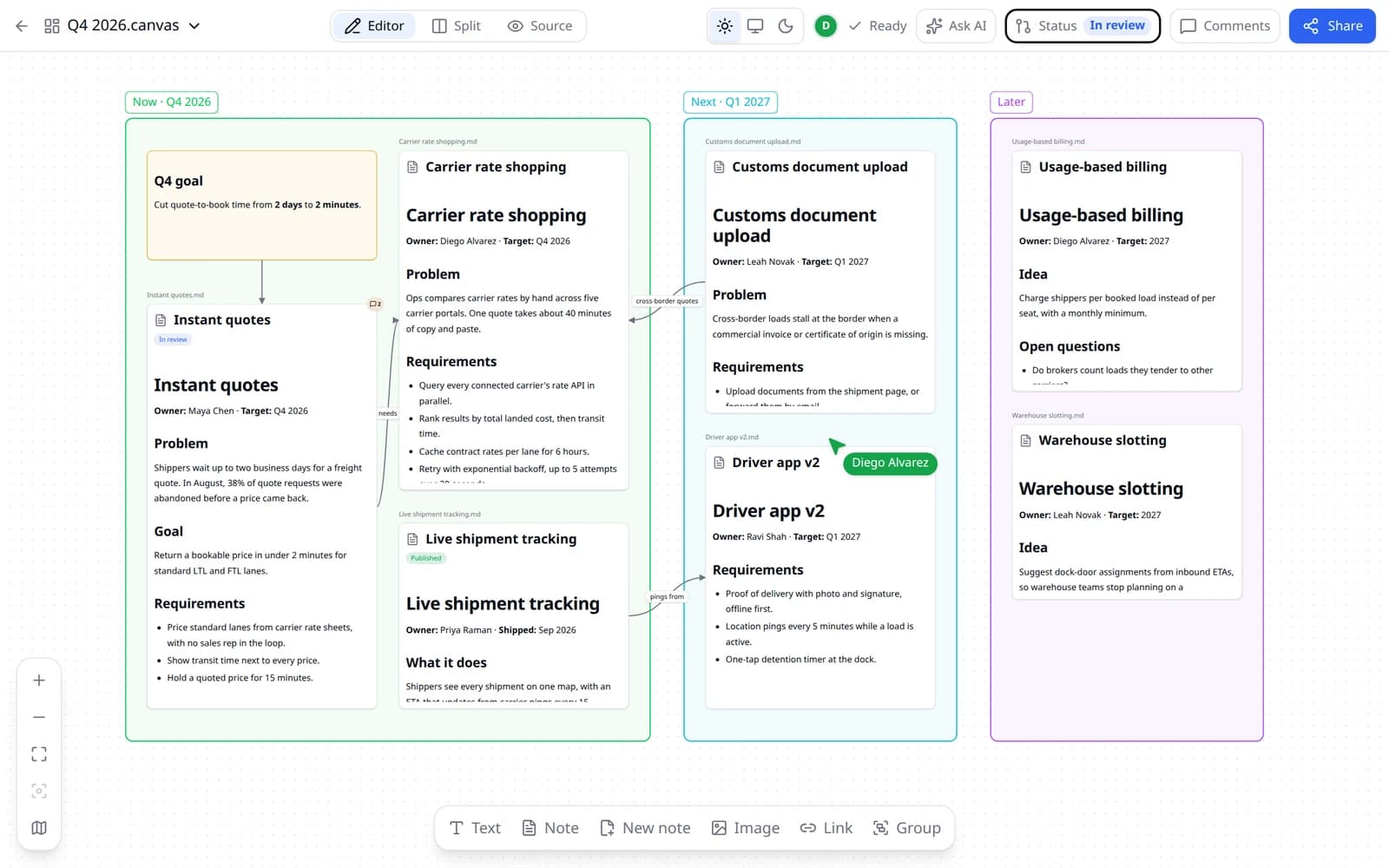
Open any .canvas file as a board you can pan and zoom. Click a note card and the note opens beside the board, with everything the editor has. Edit text cards in place, draw labeled arrows, group and color cards, and drop in images. Lay out a folder turns every note in a vault folder into a card, with each subfolder as its own group.
Teammates work on the board together, live. Comments attach to cards as pull request review threads, and the board and every note on it go to review as one set. specgit writes the board back in Obsidian's own format: cards you didn't touch stay byte for byte, and moving a card changes one line in the commit.
Review that's real
Highlight a passage and comment. The thread is a real GitHub pull request review thread under your own GitHub account, and engineers can answer it from specgit or from GitHub. Open conversations carry into each new revision of the note, still attached to the text they were about.
When a change is ready, open Status and submit it. Add reviewers and GitHub notifies them. Publishing merges the pull request, so your repo's rules hold: branch protection and required reviews work end to end, CODEOWNERS picks reviewers, and the Actions you run on pull requests, like a link checker for broken wiki links, run before the merge. Publish when approved merges the moment the last approval lands.
Pick the setup that fits your team
Teams share a vault in four ways today. The right one depends on how many of your writers use Obsidian, and whether anyone has to approve a change before the rest of the team reads it.
Obsidian Sync, shared vault
Best for: a small team that already works in Obsidian and wants the same notes on every device.
Watch out for: Sync replicates files. It doesn't let people co-edit: Obsidian's documentation says live editing of the same file isn't supported, so you won't see a teammate's cursor, and their changes appear after they sync. Every collaborator needs a Sync subscription, and a shared vault tops out at 20 of them.
Community relay plugins
Best for: a couple of Obsidian users who want live cursors in the app and are comfortable running third-party plugins.
Watch out for: Everyone needs Obsidian and the plugin, and typing together still isn't review. Nothing sits between a change and the version everyone else reads.
A plain Git vault
Best for: writers who are happy with branches and want history, diffs, and pull request review on their notes.
Watch out for: Every collaborator needs Git set up locally and resolves merge conflicts at the command line. That rules out most of the people you want to write with.
specgit on a GitHub-backed vault
Best for: mixed teams: some people live in Obsidian, and others just need to open the note and type.
Watch out for: The vault has to be in a GitHub repository. A local-only folder, or one kept in Dropbox, moves to GitHub first.
The mechanics of the last one, from GitHub App permissions to how a save becomes a commit, are on how specgit works.
You're always in control
Your notes stay plain Markdown files in your GitHub repository, readable by Obsidian and every other tool. Zero Content Retention: we never keep a copy of your documents or comments. GitHub remains the source of truth — the only things that ever touch our servers are temporary: live-collaboration state while you edit together, AI processing you explicitly invoke, and feedback you explicitly choose to share. Product analytics are content-free — never documents, comments, prompts, selections, chat, audio, repo names, or paths. Restricted or unknown regions send nothing before separate opt-in; elsewhere public events are cookieless and unidentified and signed-in events are pseudonymous with opt-out. No ad tech, sale, or retargeting.
Everyone signs in with their own GitHub account through the specgit GitHub App, with repo-by-repo permissions, and every save is a commit under their name. People without write access to the repo get a read-only view. The details are on security and data privacy.
Bring your team into your vault
Sign in with GitHub, pick the repo behind your vault, and open any note or Canvas board. Free covers 1 repository and 5 publishes a month, with unlimited collaborators.
Free to start, no credit card. Zero Content Retention — we never keep a copy.
Frequently asked questions
How do I collaborate on Obsidian notes with a team?
Put the vault in a GitHub repository and open it in specgit. Teammates edit the same notes in the browser, together and live, comment in pull request threads, and publish by merging. The other routes: Obsidian Sync shares a vault with teammates who each have a Sync subscription, a community relay plugin adds live cursors inside Obsidian, and a plain Git vault works if everyone can use Git.
Can two people edit the same Obsidian note at once?
Not in Obsidian itself: its Sync documentation says live editing of the same file isn't supported, so a teammate's edits show up after a sync. Community plugins add live editing inside Obsidian. In specgit, two people edit the same note in the browser at the same time, with live cursors, and every save lands in your GitHub repo.
Does Obsidian have real-time collaboration?
Not natively. Shared vaults through Obsidian Sync are asynchronous file sync, with conflicting edits merged when they arrive. Real-time editing comes from community plugins, or from specgit working on the GitHub repo behind the vault.
Does specgit replace Obsidian?
No. Keep writing in Obsidian. specgit works on the repo behind your vault, so teammates who don't use Obsidian edit the same notes in the browser, and changes flow both ways through Git.
Will specgit mangle my Obsidian syntax?
No. The editor understands wiki links and aliases, embeds, callouts with custom titles and fold markers, highlights, footnotes, LaTeX math, YAML frontmatter, task lists, and Mermaid diagrams. Anything it doesn't model is saved back byte for byte.
Can specgit open Obsidian Canvas boards?
Yes. A .canvas file opens as a board you can pan and zoom. Click a note card to edit the note beside the board, edit text cards in place, and comment on any card. specgit saves in Obsidian's exact format: cards you didn't touch stay byte for byte, and moving a card changes one line. The board and its notes go to review together, each on its own pull request, and publish notes first and the board last. Drawing, shapes, and embedded web pages aren't supported yet.
How is this different from Obsidian Sync or the Git plugin?
Sync keeps a vault the same across devices, and a shared vault does that for up to 20 collaborators, with version history you can restore. It has no review: no comment threads on a paragraph and no approval before an edit reaches everyone. The community Git plugin commits your vault, but every collaborator needs Git, and conflicts are theirs to resolve. specgit works on the repo itself: teammates edit in the browser, comments are pull request threads, and merge conflicts resolve in the editor.
Where do my notes live?
No. GitHub remains the source of truth — specgit never keeps a copy of your documents or comments. Live collaboration uses temporary editing state that is deleted after publish or direct commit, or after up to 7 inactive days. User-invoked AI processing and explicitly shared AI feedback are described in the Privacy Policy.
What does it cost?
Free to start: unlimited collaborators on 1 repository with 5 publishes a month, no credit card. Pro is $8 per seat per month for unlimited repositories and publishing. Sign in with GitHub through the specgit GitHub App and grant only the repositories you choose.