Write the spec like a regular doc. Free to start, no credit card.
By continuing, you agree to the Terms of Use and acknowledge the Privacy Policy. Analytics choices are separate.
the specgit blog
How to add a documentation vault to your code repository (layout, .gitignore, attachments, and agent-ready Markdown)
· the specgit team
Start with one folder on the Free plan
Connect a GitHub repository in specgit to edit Markdown, Obsidian callouts, wikilinks, and Canvas boards beside your code without breaking formatting or Git history.
By continuing, you agree to the Terms of Use and acknowledge the Privacy Policy. Analytics choices are separate.
See plans & pricingFree to start, no credit card. Zero Content Retention: we never keep a copy.
Once your team decides to keep product specs, runbooks, and user guides in the same GitHub repository as your code (a layout we call a holorepo), the first day of setup comes down to structure. Where do the files live? What happens if teammates write in Obsidian alongside engineers running git checkout in the same repo? Where do images and PDFs go? And how do you keep your Markdown clean so coding agents and internal search indexers actually read the right truth?
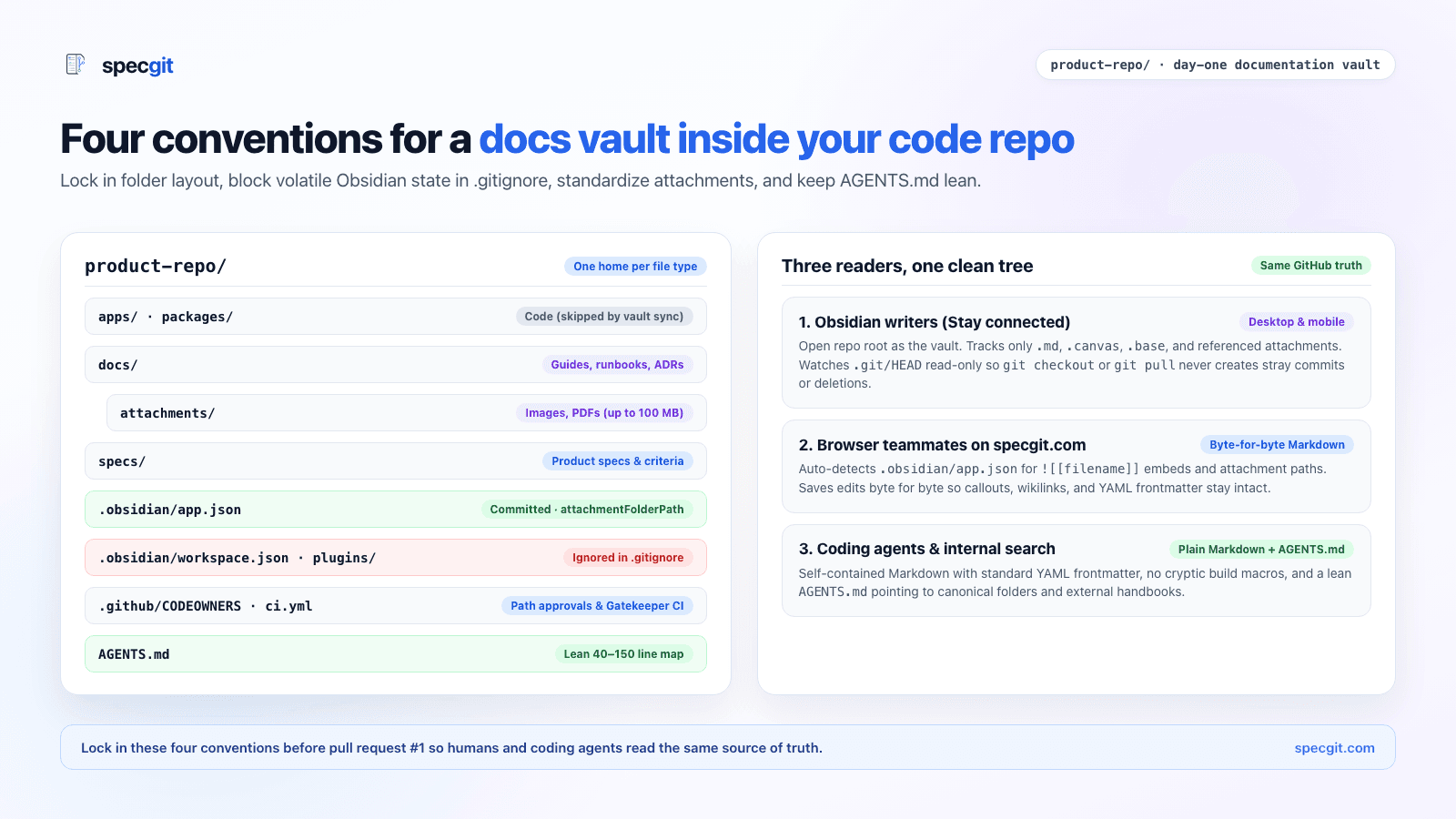
Getting these four conventions right before pull request #1 saves months of broken links, noisy .obsidian/workspace.json diffs, and coding agents citing outdated files.
1. Lock in your folder layout before pull request #1
Moving folders six months later breaks internal links, CI path filters, CODEOWNERS rules, and bookmarks. Pick one predictable top-level home for each kind of document and write it down once:
product-repo/├── apps/ # Application code├── packages/ # Shared libraries├── docs/ # User guides, architecture notes, runbooks│ └── attachments/ # Diagrams, screenshots, PDFs├── specs/ # Product specs and decision records├── .obsidian/ # Optional: shared Obsidian vault config├── .github/│ ├── CODEOWNERS # Routes /docs/ and /specs/ to docs/PM owners│ └── workflows/ci.yml # Gatekeeper CI skipping code builds on docs├── .gitignore # Blocks volatile Obsidian workspace & plugin state└── AGENTS.md # Lean map telling coding agents where truth livesTwo practical rules keep the tree clean as the repo grows:
- One obvious home per document type: Cross-cutting specs (
specs/), customer or operator docs (docs/), and service-specific READMEs beside modules (apps/billing/README.md) should never compete for the same topic. - Keep raw binaries and secrets out: Plain Markdown, Canvas boards, and diagrams belong in the repo. Raw video recordings, files over 100 MB, passwords, API keys, and unscrubbed customer personal data do not.
Opening a code repository in Obsidian (what works cleanly today)
If parts of your team write in Obsidian while engineers work in the same GitHub repository, there are two ways teams set up the vault:
- Open the repository root as your Obsidian vault (recommended when using specgit for Obsidian): In Obsidian, click Open folder as vault and pick the repository root. You do not have to worry about source code cluttering your sync: specgit for Obsidian tracks only Markdown (
.md), Canvas (.canvas), and Bases (.base) files plus attachments referenced by them, and automatically skips code files (.ts,.py,.go), dotfiles (.git/,.github/,.obsidian/,.trash/), and anything matched by.gitignore. In Obsidian itself, you can also hide code folders (apps/,packages/,node_modules/) from search and quick switcher via Settings > Files and links > Excluded files. - Place
.obsidian/insidedocs/for web-only vault detection: If you do not want.obsidian/at the repository root, placing.obsidian/app.jsoninsidedocs/lets specgit.com recognizedocs/as a vault root in the browser (honoring your attachment folder and![[filename]]embeds). Note that specgit for Obsidian currently maps a local vault folder to the repository root rather than a repository subfolder, so teams connecting directly through the Obsidian plugin should map at the repository root (or use a dedicated docs repository linked fromAGENTS.md).
2. Add the right .gitignore so Obsidian never pollutes code history
The single most common mistake when bringing Obsidian into a Git repository is committing .obsidian/workspace.json or .obsidian/plugins/.
workspace.json and workspace-mobile.json rewrite themselves every time someone switches tabs, resizes a pane, or scrolls a note. Committing them creates constant merge conflicts across teammates and devices. Community plugin folders (.obsidian/plugins/) are even riskier because plugin data.json files often store local paths, cached state, or private tokens.
Commit only the small structural config files you actually want the team to share (such as app.json for your attachment folder setting, appearance.json, core-plugins.json, hotkeys.json, and optional themes/ or snippets/), and ignore everything else in .obsidian/:
# Obsidian volatile UI state, caches, and plugin data.obsidian/workspace.json.obsidian/workspace-mobile.json.obsidian/cache/.obsidian/plugins/.trash/ # OS and editor noise.DS_StoreThumbs.dbdesktop.iniWhy committing .obsidian/app.json pays off: Setting "attachmentFolderPath": "docs/attachments" (or "./attachments") inside .obsidian/app.json gives both Obsidian and specgit.com the exact same rule for where new images and PDFs land.
Coexisting with local Git (git checkout, git pull, git rebase)
Engineers and writers often worry that turning on automatic vault sync inside a local Git checkout will accidentally turn a git checkout or git pull into stray draft commits or file deletions.
In specgit for Obsidian, Stay connected watches your local repository's Git state (reading .git/HEAD, reflog, and stash metadata read-only on desktop). When Git switches branches, pulls commits, merges, or resets files, specgit detects the Git activity, never sends Git-driven deletions to GitHub, and holds Git-touched files in the Status panel instead of auto-committing them as your own edits. (If more than 20 files change at once, a burst guard holds them in Status as well.)
3. Set one predictable attachment and link convention
Broken images and mismatched link paths are the surest way to make engineers and writers stop trusting a docs folder. Lock in three rules on day one:
- Pick one attachment folder: Put shared images, diagrams, and PDFs in a single folder (such as
docs/attachmentsor./attachmentsnext to each section) and record it in.obsidian/app.jsonasattachmentFolderPath. - Keep file sizes practical: Both specgit.com and specgit for Obsidian transfer images, PDFs, audio, and other attachments up to 100 MB per file (SVG uploads on specgit.com are capped at 20 MB), and resolve Obsidian
![[filename]]embeds cleanly. If a repository does not include.obsidian/, specgit.com stores uploaded attachments underassets/specgit/using standard relative Markdown links. - Keep Markdown dialect intentional: Stick to plain GitHub-flavored Markdown across shared engineering docs, or adopt Obsidian-flavored syntax (wikilinks
[[Note]], callouts, YAML properties, Canvas boards) consistently across the vault. Because specgit saves files byte for byte outside the exact block you edited, writers editing in the browser never strip out Obsidian callouts, wikilinks, custom task statuses, or frontmatter that teammates rely on.
4. Write Markdown and AGENTS.md for coding agents and internal search
There is a newer reader in every repository now: coding agents (Claude, ChatGPT, Cursor, Codex, GitHub Copilot) and internal search or retrieval indexers pointed directly at your Git tree. A layout that looks tidy to a human can quietly mislead an agent if you overlook four habits:
- Prefer plain, self-contained Markdown over build-time macros: Custom framework shortcodes and component tags (
<ReusableSnippet id="limits" />) often render cleanly on a docs website, yet leave raw.mdfiles empty or cryptic when a coding agent reads the repository directly. Keep real specifications and rules in readable Markdown. - Keep YAML frontmatter standard and predictable: Stick to simple key-value frontmatter (
status,owner,updated) between standard---fences. Unusual frontmatter tricks break lightweight parsers and search indexers. - Keep private or draft-only material cleanly separated: Never mix internal-only or unreleased notes into a directory tree that an internal company or customer-facing search indexer crawls blindly.
- Keep
AGENTS.mdlean and concrete (roughly 40 to 150 lines): TreatAGENTS.mdat the repository root as a short operational map, not an exhaustive encyclopedia. Massive auto-generated instruction files waste context and cause agents to miss critical rules. Include only what changes an agent's output:- Exact build, test, and verification commands.
- Where canonical product specs, architecture decision records, and user docs live (plus which folders are deprecated or archived, if any).
- Pointer links to any separate company-wide handbook repository so agents do not invent duplicate policy files locally.
- Files agents must never edit by hand (generated clients, lockfiles, vendored files).
- If part of your team uses tools that look for
CLAUDE.md, keep one source of truth by symlinkingCLAUDE.mdtoAGENTS.md(ln -s AGENTS.md CLAUDE.md).
# AGENTS.md ## Where product context lives- `specs/` holds current product specifications and acceptance criteria.- `docs/` holds user-facing guides and operational runbooks.- `docs/adr/` holds architecture decision records (do not rewrite accepted ADRs; add a new one).- Company-wide security and incident policies live in `github.com/org/handbook` (do not duplicate here). ## Commands- Typecheck: `pnpm typecheck`- Tests: `pnpm test` ## Boundaries- Never edit `src/generated/**` by hand.- Update the matching spec or doc in the same pull request whenever behavior changes.5. Pair structure with GitHub guardrails and low-friction editing
Folder structure alone does not keep a repository healthy if contributing still feels painful. Pair the layout above with two complements:
- Governance in GitHub: Add the branching model, Gatekeeper CI (
plan+ci-gate), and.github/CODEOWNERSor Rulesets we walked through in How to coordinate code releases, docs branches, and GitHub pull request rules so docs pull requests clear checks cleanly and route to the right owners. - A visual front door for the rest of the team: Once your folders,
.gitignore, attachments, andAGENTS.mdare in place, teammates who never want to open a terminal can still contribute directly. Writers and product managers can import existing Word, PowerPoint, Excel, PDF, or Notion exports straight into clean Markdown, co-edit live in the browser or inside Obsidian, combine multi-doc launches with Group together (on Pro and Pro Plus), and submit changes for native GitHub review.
Start with one folder and grow from there
You do not need to migrate every page your company has ever written on day one. Add specs/, commit the Obsidian .gitignore rules above, write a 40-line AGENTS.md pointing at your real source of truth, and move the next active feature spec into the repository.
Docs belong where the work lives. When your repository layout is predictable, your .gitignore blocks editor noise, and your Markdown stays readable as plain text, humans and coding agents both read the same truth without fighting the repository.
Want to test how an existing vault or docs folder feels in a visual editor on top of GitHub? Try specgit on a sample doc, read what a holorepo is, or connect one repository on the Free plan.
More from the blog
- How to coordinate code releases, docs branches, and GitHub pull request rules when docs live beside code
- Introducing specgit for Obsidian: your whole team in your vault
- Now in specgit: Group together, one review for related docs
- Introducing Writing mode: a woodshed for your words
- Your Obsidian vault, edited together, exactly as you wrote it
- Introducing Canvas: your whole team on the board
- specgit is now available on Microsoft Marketplace
- User insights belong in the repo
- Why product specs go stale (and what keeps them current)
- Notion vs GitHub for product specs
- PRD chatbot vs docs in the repo
- All posts