Write the spec like a regular doc. Free to start, no credit card.
the specgit blog
Introducing Writing mode: a for your words
We couldn't settle on one word for it either.
· the specgit team
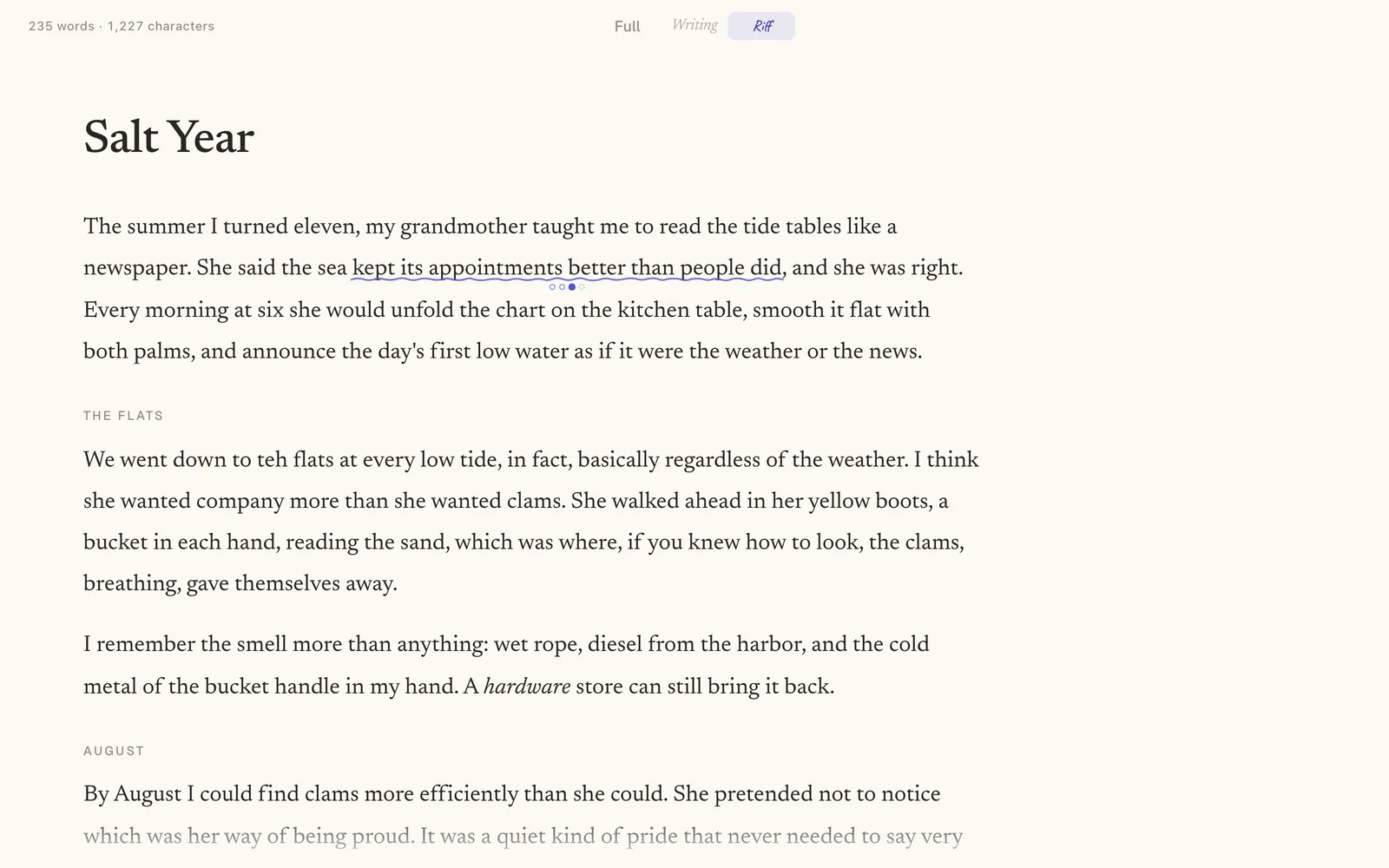
Take your next draft to the woodshed
Open a Markdown doc from your GitHub repo and switch to Writing. specgit handles the Git for you. Free to start.
Free to start, no credit card. Zero Content Retention: we never keep a copy.
Jazz musicians have a word for the practice nobody hears: woodshedding. You take your horn somewhere where no one can hear you and play full out, loudly, and leaving no corner of your instrument unexplored. You do this over and over again until you land on excellence ready to bring back to the band.
Writing works the same way. A doc starts with one person trying three versions of the opening line, keeping one, and pasting the other two at the bottom under a heading that says "maybe." By the time the draft goes to review, the choices they were weighing are gone or scattered, and nobody else ever sees them.
Today we're launching Writing mode in specgit: a woodshed for the docs that live in your GitHub repo. Riff lets you try other wordings right in the text, and a co-editor marks and trims your draft instead of writing it. When you're ready, you switch back and bring it to the band. Everything you decided is in the doc, and review works the way it always has.
Writing mode and Riff are on every specgit plan, including Free. The co-editor uses agent usage, so it comes with Pro and Pro Plus. You can try Writing and Riff on a sample doc without an account, or watch the four-minute demo.
Everything else steps aside
The top bar now has a switch in the middle with three stops: Full, Writing, and Riff. Full is the editor you know, with the toolbar, comments, review, and every panel. Click Writing, and all of that fades away. The page holds just your document, set in a serif font at a comfortable width, with a word count in the top left corner. A few controls in the top right corner (Co-editor, Display, the doc's status, and Shortcuts) come back when you move the pointer and fade again when you stop.
We wanted it to feel calm, and a little bit fun. Entering Writing, trying an option, keeping a choice, and trimming a draft each make a small sound. If you'd rather work in silence, turn Sound off in Display. The same panel sets the theme (light, dark, or whatever your system uses), the text size, the page width, the font, and whether your docs open straight into Writing.
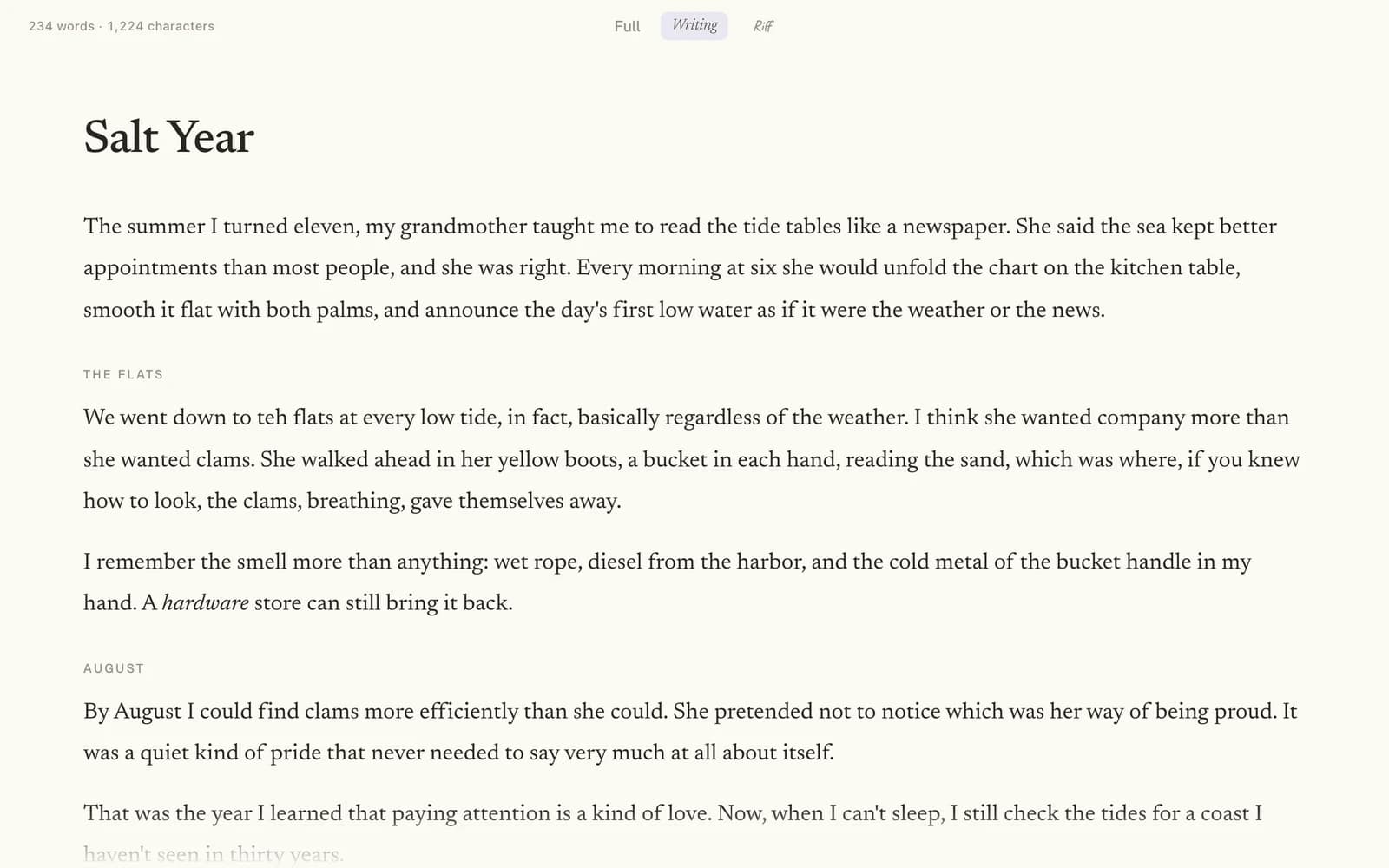
Riff: try other wordings in place
This is where writing gets a little more fun. Few sentences come out right the first time. More often you get two or three candidates and a hunch, and Riff gives the candidates somewhere to live. Turn on Riff, select a word, phrase, sentence, or paragraph, and choose Option to write another version of it. Add as many as you like. The passage gets a wavy underline with a dot for each option, like the word in this post's title, so you can see at a glance where you're still deciding.
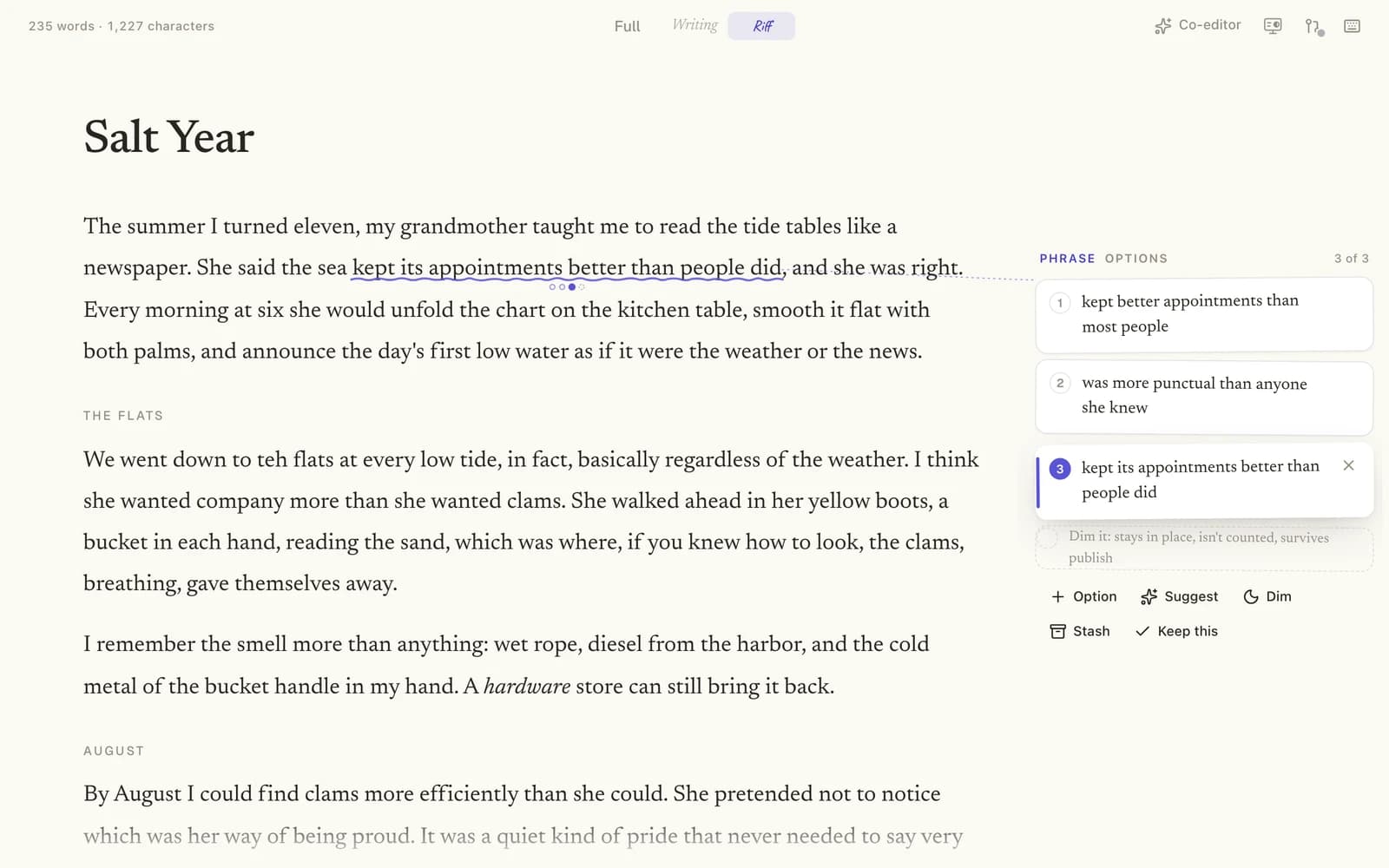
Click into an underlined passage and its options open in a card beside the text, numbered, with the one on the page highlighted. Click any option to swap it into the sentence and read it in place, or step through them with the arrow keys. When one reads right, Keep this keeps it and clears the rest.
Two more buttons on the same card are for passages you aren't sure belong at all.
- Dim marks a passage you might cut. It stays where it is, faded, and the word count leaves it out, so you can read the piece as if it were gone without losing it. A dimmed passage is still in the file, so if you publish while one is dimmed, specgit asks first: stash it, delete it, or publish it as written.
- Stash takes a passage out of the doc and keeps it for later. The Stash drawer remembers the section each passage came from and the spot inside it, and Put back returns it there. Your stash stays with the doc after you publish, so a paragraph you set aside this week is still there for the next revision.
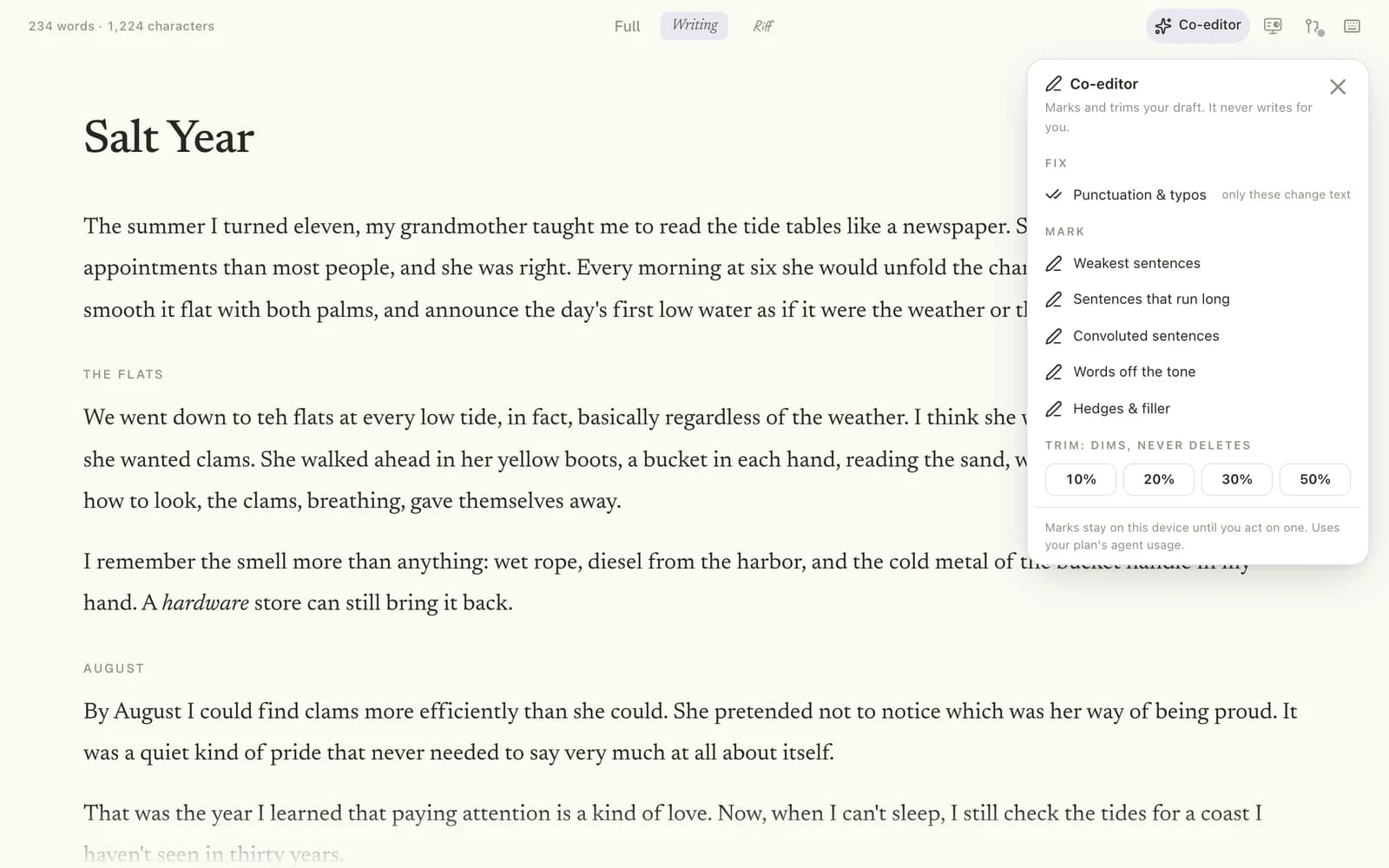
A co-editor that marks and trims
Writing mode also has a co-editor, and we built it to co-edit, not co-write. Open Co-editor in the top right corner and pick the kind of help you want.
- Fix finds punctuation mistakes and typos. It's the only one that changes text, and each fix still waits for you: accept them one at a time, skip the ones you don't want, or accept them all.
- Mark points out the sentences worth a second look: the weakest sentences, sentences that run long, convoluted sentences, words off the tone, or hedges and filler. Each mark opens a card where you decide what to do: dim the sentence, stash it, write an option for it, delete it, or dismiss the mark.
- Trim asks for a shorter draft, by 10, 20, 30, or 50 percent. A trim dims and never deletes. You read the draft with the trimmed passages faded, then choose Keep trims to leave them dimmed or Cancel to put everything back.
Marks stay on your device until you act on one. If you want one more wording to compare against your own, Suggest on a Riff card asks the agent for an option, which joins the list like any other and changes nothing until you keep it. The co-editor and Suggest use your plan's agent usage, so they come with Pro and Pro Plus.
From the woodshed to review
Say you're a technical writer, and on Monday a product manager asks for a help page on the new export settings. You open a new doc in specgit and switch to Writing. You draft the page in one sitting, and where you can't decide between two ways to explain a setting, you give the sentence both options and keep going. Before lunch you run a 20 percent trim, keep most of what it dims, and stash a paragraph about an advanced setting you might cover later.
Then you switch back to Full. The doc reads exactly as you left it, with your chosen options in the text and the dimmed passages shown as ordinary text, the way a reviewer will see them. You submit it for review. Your product manager gets a GitHub notification, follows the link into specgit, leaves two comments, and approves. If they'd rather review in GitHub, it's all there too. The sentence with two options is a thread on the pull request (GitHub's name for a set of changes that goes to review together) that opens "Content options from specgit Writing: 2 options for this sentence. Not a review comment." Dimmed and stashed passages get threads of their own, each with a link to see it formatted in specgit. When it's approved, you publish, and the paragraph you stashed is still in the doc's stash for the next revision.
Where it works
Writing mode works on Markdown docs, including Obsidian notes. It isn't available for HTML docs or Canvas boards. Riff runs on live editing, so it's off on a doc you can't edit or one that isn't open for live editing. On a phone, Writing and Riff work with taps and swipes, and the keyboard shortcuts are for desktop.
Why it matters
specgit started as a way for a whole team to edit and review the docs that live in GitHub, and that's still the heart of it. But the band only hears what you bring back from the woodshed. Every doc starts with one person working a sentence over, and that part deserves a good room too. We also think the words should stay yours. A co-editor can tell you which sentence is weakest. Rewriting it is still your call.
More from the blog
- Your Obsidian vault, edited together, exactly as you wrote it
- Introducing Canvas: your whole team on the board
- specgit is now available on Microsoft Marketplace
- User insights belong in the repo
- Why product specs go stale (and what keeps them current)
- Notion vs GitHub for product specs
- PRD chatbot vs docs in the repo
- All posts