Write the spec like a regular doc. Free to start, no credit card.
the specgit blog
Obsidian and 5 open-source alternatives: specgit supports all of them in GitHub
· the specgit team
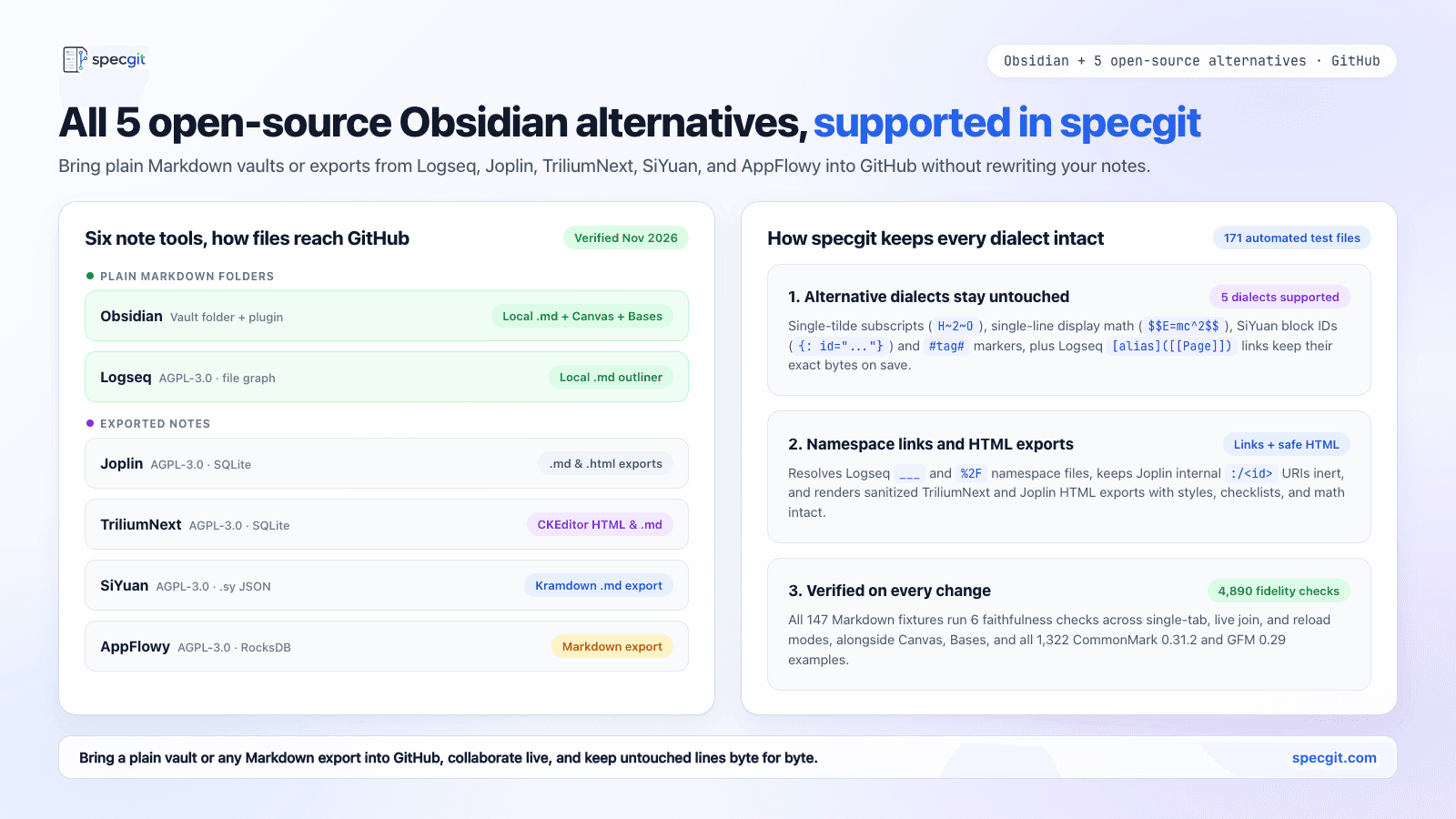
Bring your notes from any of these tools into GitHub
Start from a blank repo, connect an Obsidian vault, or upload exports. specgit handles the Git and keeps untouched Markdown lines byte for byte.
Free to start, no credit card. Zero Content Retention: we never keep a copy.
If you follow knowledge-management tools, you have probably seen the wave of open-source Obsidian alternatives. In November 2026, XDA Developers rounded up five of the most widely used options alongside Obsidian: Logseq, Joplin, TriliumNext, SiYuan, and AppFlowy.
The good news is simple: no matter which one you or your teammates write in, specgit supports notes and exports from all of them in GitHub. You can bring a plain-file vault or an export straight into a repository, collaborate live in a visual editor, and review changes through native GitHub pull requests without rewriting everyone's formatting.
Here is how all six tools store and export notes as of November 2026, how specgit preserves each tool's syntax in GitHub, and how we test that support on every change.
The 5 open-source Obsidian alternatives at a glance
Each tool takes a different approach to local storage. Obsidian and Logseq (in its classic file-graph mode) keep plain Markdown folders directly on disk, while Joplin, TriliumNext, SiYuan, and AppFlowy store notes in an embedded database and export Markdown or HTML files.
Once those folders or exports live in a GitHub repository, your whole team gets one shared workflow: every save is a commit under the author's name, inline comments become review threads on a pull request (GitHub's name for a set of changes that goes to review together), and coding agents can read the docs directly beside the code.
| Tool | On-disk storage | License (Nov 2026) | How files reach GitHub | Dialect details specgit preserves |
|---|---|---|---|---|
| Obsidian | Plain .md files, .canvas boards, .base views | Closed source (free for personal and commercial work since Feb 2025) | Direct GitHub repo or free specgit for Obsidian plugin | Wikilinks, embeds, callouts, custom tasks, highlights, YAML frontmatter, Canvas boards, and Bases. |
| Logseq | Plain .md outliner (pages/, journals/); DB mode offers an opt-in Markdown mirror | AGPL-3.0 open source | Direct GitHub repo or Markdown mirror | Outliner bullets, property:: metadata, [alias]([[Page]]) links, and ___ or %2F namespace links. |
| Joplin | SQLite database with local resource blobs | AGPL-3.0 clients | Markdown + frontmatter export, or HTML export | Single-tilde H~2~O subscripts, YAML metadata, inert :/<id> internal links, and sanitized HTML exports. |
| TriliumNext | SQLite database storing CKEditor 5 HTML | AGPL-3.0 open source | HTML directory tree or Markdown export | Sanitized rich HTML exports with style.css, checklists, include-note blocks, and math markup, plus Markdown exports. |
| SiYuan | .sy JSON block files plus SQLite index | AGPL-3.0 core | Kramdown-flavored Markdown export | Trailing {: id="..."} Kramdown block IDs, closed #tag# markers, callouts, and single-tilde subscripts. |
| AppFlowy | RocksDB plus Yrs CRDT local store | AGPL-3.0 client (commercial license for multi-user self-hosting) | Markdown export | Single-line $$E=mc^2$$ display math, [uuid](Subpage Title) subpage references, callouts, and task lists. |
How specgit keeps syntax from all five tools intact
Most teams are not starting from an empty folder. Someone already has research notes in Logseq, runbooks exported from Joplin or SiYuan, specs exported from AppFlowy, or an HTML archive from TriliumNext. When those files move into GitHub, a visual editor has one job before anything else: change only what you edited and leave every other byte alone.
Each of these tools adds its own Markdown conventions on top of standard syntax, and a generic Markdown writer quietly rewrites them the moment you save an edit.
Here is what a standard Markdown writer produces when you edit two lines in a note that mixes SiYuan callout IDs, Joplin subscripts, AppFlowy single-line display math, and a Logseq aliased wikilink:
@@ -1,9 +1,9 @@ # Sync architecture notes -> [!NOTE]-> Keep offline exports readable in plain text (draft).-{: id="20261124-callout"}+> \[!NOTE]+> Keep offline exports readable in plain text (final).+> {: id="20261124-callout"} -Water formula H~2~O and energy $$E=mc^2$$ stay literal in this draft.+Water formula H~~2~~O and energy $E=mc^2$ stay literal in this final note. -See [architecture spec]([[Architecture/Spec]]) and #backend/api# for details.+See \[architecture spec](\[\[Architecture/Spec]]) and #backend/api# for details.The chemistry formula H~2~O turns into strikethrough H~~2~~O. Single-line display math collapses from $$E=mc^2$$ to $E=mc^2$. The SiYuan block ID gets pulled inside the callout as a quoted line, and the Logseq aliased wikilink gets escaped with backslashes.
Here is the exact same edit saved by specgit:
@@ -1,9 +1,9 @@ # Sync architecture notes > [!NOTE]-> Keep offline exports readable in plain text (draft).+> Keep offline exports readable in plain text (final). {: id="20261124-callout"} -Water formula H~2~O and energy $$E=mc^2$$ stay literal in this draft.+Water formula H~2~O and energy $$E=mc^2$$ stay literal in this final note. See [architecture spec]([[Architecture/Spec]]) and #backend/api# for details.Here is how specgit preserves the syntax each tool relies on, without altering your repository or requiring a custom plugin:
- Single-tilde subscripts (
H~2~O) stay literal: Joplin and SiYuan use single tildes for subscripts, while GitHub Flavored Markdown parsers often normalize single~into double~~strikethrough on save. specgit preserves single-tilde spans as raw inline text even when you edit the same paragraph, while keeping~~deleted~~as editable strikethrough. - Single-line display math (
$$E=mc^2$$) keeps its delimiters: AppFlowy and several Markdown exporters emit single-line$$...$$formulas. specgit preserves them on one line instead of collapsing them to$...$, while standard$inline$and multi-line$$math blocks continue to render with KaTeX. - SiYuan Kramdown block IDs and
#tag#markers stay clean: Trailing{: id="..."}lines after callouts, blockquotes, and lists split cleanly so editing the container never quotes or indents the ID line. Closed#backend/api#tags parse as a single tag mark without leaving a stray#behind. - Logseq aliased links, namespaces, and AppFlowy subpage references stay unescaped: Inert
[alias]([[Other Page]])and[subpage-uuid](Subpage Title)bracket pairs round-trip without stray backslashes. Clicking a Logseq namespace link such as[[Architecture/Spec#Overview]]resolvespages/Architecture___Spec.mdandpages/Architecture%2FSpec.mdautomatically, while preferring a realArchitecture/Spec.mdfolder when one exists. - Joplin internal links and TriliumNext or Joplin HTML exports behave safely: Joplin's internal
:/<32-hex-id>URIs stay inert instead of resolving as broken repository paths. TriliumNext and Joplin HTML exports open as sanitized rich HTML in specgit, keepingstyle.csslinks, checklists,include-notesections, and math markup intact while stripping scripts and event handlers. (Note: rich HTML files in specgit edit as single-writer documents and their saves are not byte for byte, unlike Markdown files.)
How we test support across all six tools
Supporting six different note tools reliably takes automated proof on every code change, not a manual spot check. Realistic fixtures for Logseq, Joplin, TriliumNext, SiYuan, and AppFlowy run inside the same automated faithfulness suite we run for Obsidian vaults (covered in detail in our Markdown fidelity post).
- 171 automated test files: 147 Markdown files (60 copied from 12 public vaults plus 87 targeted dialect files, including dedicated fixtures for Logseq, Joplin, TriliumNext, SiYuan, and AppFlowy), 11 Obsidian Canvas boards, and 13 Obsidian Bases files.
- 4,890 faithfulness checks: All 147 Markdown files run six properties (unchanged save, single-block edit locality, external tool edits, five-round alternating edits, Git three-way merge, and live multi-writer merge) across three collaboration modes (single tab, live join, and reload), alongside three-mode and card-move checks for the 11 Canvas boards, single-tab byte checks for the 13 Bases files, plus table-cell and inline-span guards.
- 1,322 specification examples (6,674 checks): Every worked example from CommonMark 0.31.2 and GitHub Flavored Markdown 0.29 runs alongside the vault suite on every change.
- Dedicated link and HTML sanitization tests: Unit tests verify Logseq
___and%2Fnamespace link resolution, Joplin:/<id>link safety, and TriliumNext and Joplin HTML export sanitization so scripts and event handlers are stripped while note structure stays intact.
Working with your notes in GitHub
No matter which tool your notes start in, bringing them into GitHub with specgit takes a few clicks and asks no one on your team to learn Git:
- Obsidian or Logseq file folders: Connect the repository directly in specgit (or use Put this vault on GitHub in the free, open-source MIT specgit for Obsidian plugin on desktop and phone). Teammates edit live from a browser or inside Obsidian, while saving, commenting, and publishing connect directly to GitHub commits, review threads, and merges.
- Joplin, TriliumNext, SiYuan, or AppFlowy exports: You do not need files sitting in GitHub before you start. Create a document from scratch, upload
.mdor.htmlexports directly into a repository, or import Word, PowerPoint, Excel, and PDF files. Untouched Markdown blocks keep their exact bytes on save, and engineers review changes through their existing pull request workflow. - What plain files in GitHub cover: Specs, handbooks, meeting notes, runbooks, onboarding guides, tables, task lists, linked pages, and visual Canvas boards all live cleanly in GitHub for a team of one or an entire organization. Plain Markdown does not provide live queryable relational database views (filtering, sorting, rollups, and relations), and rich HTML documents edit as single-writer files rather than live multi-writer Markdown.
With Zero Content Retention, specgit never keeps a copy of your documents or comments. GitHub remains the source of truth. The Free plan covers 1 repository and 5 publishes a month with unlimited collaborators; Pro is $8 per seat per month (20% off annual), and only editors take a seat while viewing and commenting stay free.
Keep your docs where the work lives
Whether your team writes in Obsidian, Logseq, Joplin, TriliumNext, SiYuan, or AppFlowy, your notes should never get rewritten the moment they land in GitHub. Put the docs your team relies on where the code and review history already live, and edit them in a tool tested across every dialect you bring with you.
Try specgit on a sample doc · Add a docs vault to your code repo · Obsidian plus GitHub · Pricing
More from the blog
- Collaborate in real time, right from the comfort of your own agent
- Beyond GitBook Git Sync: why docs work better directly on GitHub
- How to add a documentation vault to your code repository (layout, .gitignore, attachments, and agent-ready Markdown)
- How to coordinate code releases, docs branches, and GitHub pull request rules when docs live beside code
- Introducing specgit for Obsidian: your whole team in your vault
- Now in specgit: Group together, one review for related docs
- Introducing Writing mode: a woodshed for your words
- Your Obsidian vault, edited together, exactly as you wrote it
- Introducing Canvas: your whole team on the board
- specgit is now available on Microsoft Marketplace
- User insights belong in the repo
- Why product specs go stale (and what keeps them current)
- Notion vs GitHub for product specs
- PRD chatbot vs docs in the repo
- All posts