← Back to specgit

Collaborate in real time, including from your own agent

Working directly in GitHub gives you commits and diffs, not a shared room. specgit puts real-time live collaboration rooms on top of your GitHub repository so teammates edit visually, leave inline comments, and manage publishing without leaving specgit. With our remote MCP server (https://specgit.com/api/agent), we extend what Ask Agent already does directly to Claude, ChatGPT, Cursor, and any MCP client, using zero specgit agent usage.

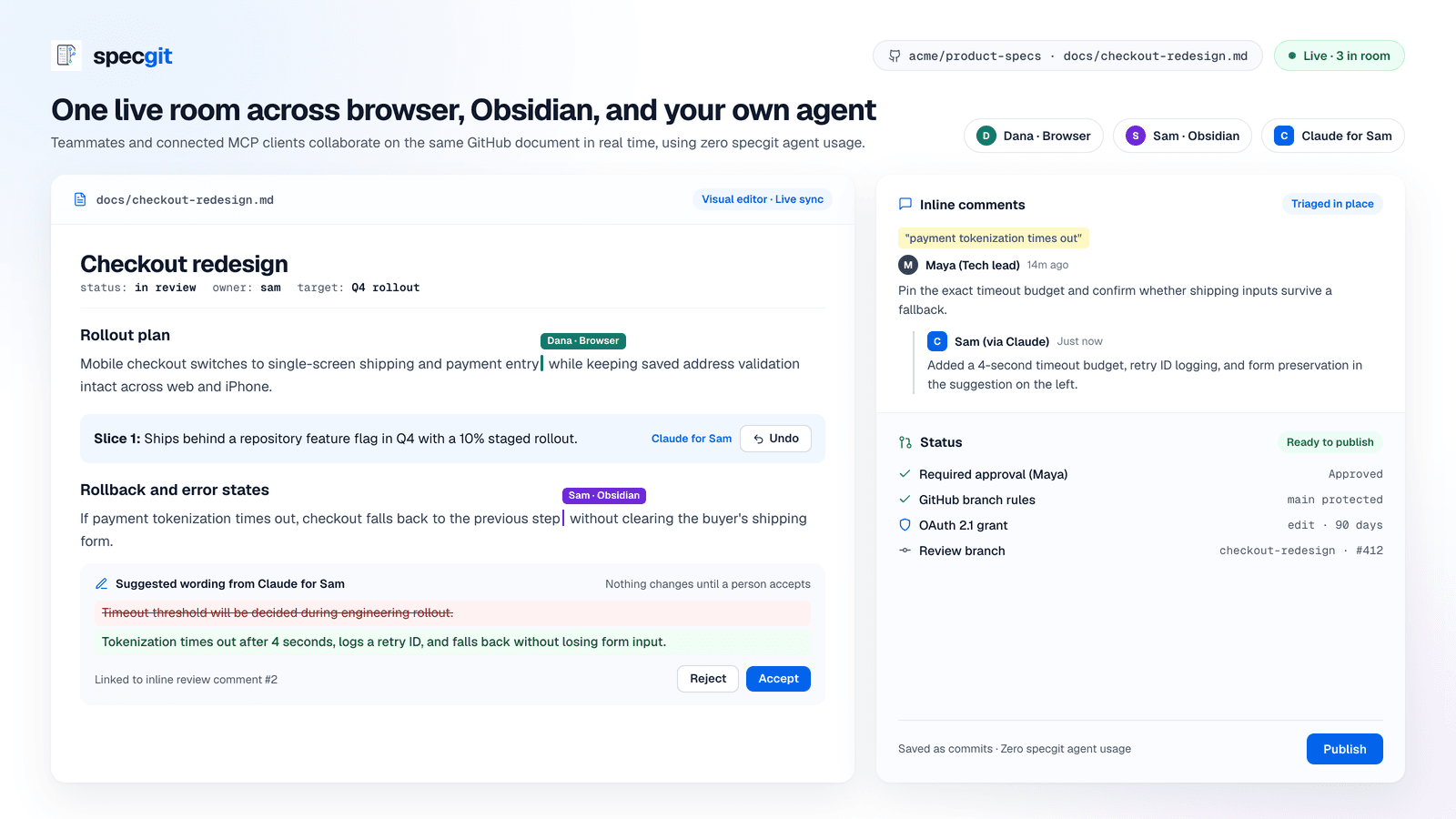
A real-time specgit live collaboration room on docs/checkout-redesign.md showing Dana editing in a browser, Sam editing in Obsidian, and Claude for Sam proposing a wording update with Accept, Reject, and Undo controls alongside inline comments and a Ready to publish Status panel.
Teammates in browsers and Obsidian collaborate in the same live room beside your connected agent.

One live room across browsers, Obsidian, and your favorite agents

  • Real-time collaboration, not raw repo commits

    Teammates in a browser on specgit.com, teammates in Obsidian on desktop or phone, and your connected agent edit the same live document together. Everyone sees each other's cursors and live edits as they happen, with one-click Undo on direct agent changes.

  • Full teammate capabilities from the comfort of your own agent

    Everything human collaborators and Ask Agent do in specgit now works from your favorite host: reading unsaved live drafts, editing passages or sections, proposing wording with Accept and Reject, answering inline comments, running Review and Triage, updating Obsidian Canvas boards and Bases, and opening the publish card.

  • Embedded live editor in chat

    In Claude, ChatGPT, and Cursor, the live specgit editor appears right inside your conversation (via MCP Apps), with full-screen access to comments and the Status panel. In Gemini, Grok, VS Code, and other MCP hosts, every result links directly to the live document on specgit.com.

Setup by host

Every host points at the same remote server address, https://specgit.com/api/agent. Sign in with GitHub when prompted and choose what the agent can do.

Claude and Claude Code

Live editor (web & desktop)

Open Customize → Connectors in Claude web or desktop, add a custom connector pointing to https://specgit.com/api/agent, choose Connect, and sign in with GitHub (Claude web and desktop show the embedded live editor; Claude Code returns direct specgit.com links). In Claude Code, add it from your terminal:

Claude Code

claude mcp add --transport http specgit https://specgit.com/api/agent

ChatGPT

Embedded live editor

Turn on developer mode in ChatGPT settings, add a custom connector pointing to https://specgit.com/api/agent with OAuth sign-in, and connect with GitHub. Works on ChatGPT web and iPhone.

Cursor

Embedded live editor

Use the one-click install link, or add specgit to ~/.cursor/mcp.json:

~/.cursor/mcp.json

{
  "mcpServers": {
    "specgit": {
      "url": "https://specgit.com/api/agent"
    }
  }
}

VS Code

Direct specgit.com links

Use the one-click install link, or add specgit to .vscode/mcp.json in your workspace:

.vscode/mcp.json

{
  "servers": {
    "specgit": {
      "type": "http",
      "url": "https://specgit.com/api/agent"
    }
  }
}

Gemini and Grok

Direct specgit.com links

Add a custom MCP connector pointing to https://specgit.com/api/agent in Gemini Connectors or Grok Connectors, then sign in with GitHub on the consent page.

Windsurf and any MCP client

Direct specgit.com links

Add https://specgit.com/api/agent as a remote Streamable HTTP MCP server. Clients with OAuth discovery sign in automatically; custom clients can follow the full OAuth 2.1 + PKCE walkthrough.

The official MCP Registry entry is com.specgit/docs-agent, and public setup guides live in github.com/fnfirst/specgit-mcp. Need OAuth 2.1 discovery details, tool schemas, or rate limits? Read the developer reference or the launch post.

Permissions and review rules you control

  • OAuth 2.1 with zero API keys

    Sign in through the specgit GitHub App and allow Read documents, Read and comment, or Read, comment and edit depending on what the host asks for (a host requesting edit access can be limited to Read and comment on the consent page), plus a grant length (30 days, 90 days, or Until I remove it).

  • Publishing follows GitHub's rules

    Read and comment grants cannot submit for review or publish. Edit grants can show the status card and can also submit for review or publish on documents you can open, while GitHub's branch protection and required-review rules always apply.

  • Suggestions wait for people

    Only a person can accept or reject a suggested edit.

  • No deletes, instant revoke

    No tool deletes a file. New documents always start as a draft review. Pause an agent from inside a document, or remove any agent at any time in Settings → Connected agents.

Privacy and plans

Zero Content Retention

specgit never keeps a copy of your documents or comments. Temporary live-collaboration state is deleted after publish or direct commit, or after 7 inactive days (swept daily, up to 8 days). What a connected agent reads through specgit's tools is processed by that agent's provider under your own agreement with them.

Read Security and data privacy

Plans

Reading, reviewing, and commenting work on every plan, including Free. Opening the embedded live editor and editing require the repository's owner on Pro ($8/seat/month) or Pro Plus ($16/seat/month; 20% off annual). Connected agents run on their host's own model and use zero specgit agent usage.

See pricing

Join your team's live room from your favorite agent

Connect https://specgit.com/api/agent in Claude, ChatGPT, Cursor, or any MCP client, sign in with GitHub, and choose what it can do.

See plans & pricing

Free to start, no credit card. Zero Content Retention: we never keep a copy.

Frequently asked questions

How is specgit MCP different from using GitHub's MCP server directly?
GitHub's MCP server works on static files, commits, and API objects. specgit's MCP server puts your agent inside specgit's real-time live collaboration rooms beside teammates in browsers and Obsidian, with live cursors, inline comment threads, suggestion cards (Accept and Reject), one-click Undo, Obsidian Canvas board layout, guided publishing through the Status panel, and an embedded live editor inside Claude, ChatGPT, and Cursor.
Which agents work with specgit's MCP server?
Any MCP client that supports remote Streamable HTTP and OAuth 2.1, including Claude (web, desktop, and Claude Code), ChatGPT (web and iPhone), Cursor, VS Code, Gemini, Grok, and Windsurf. Claude, ChatGPT, and Cursor also render the live specgit editor right inside the conversation.
Does connecting Claude, ChatGPT, or Cursor use my specgit agent usage?
No. Connected agents run on their host's own model and use zero specgit agent usage. Reading, reviewing, and commenting work on every plan including Free. Opening the embedded editor and editing over MCP require the repository's owner to be on Pro or Pro Plus.
Can an outside agent publish or delete my docs?
No tool can delete a file. Read and comment grants cannot submit a document for review or publish it. With an edit grant, the agent can open the submit or publish card and can also submit for review or publish on documents you can open, subject to your repository's GitHub branch protection and required-review rules.
Does specgit keep a copy of what my agent reads or writes?
No. Zero Content Retention applies to connected agents too: specgit never keeps a copy of your documents or comments. Temporary live collaboration state is deleted after publish or direct commit, or after 7 inactive days (swept daily, up to 8 days). What the agent reads through specgit's tools is processed by that agent's provider under your agreement with them.
How do I revoke an agent's access?
Open Settings → Connected agents in specgit and remove the connection. Access ends right away, and when your last connected agent is removed or expires, specgit deletes the encrypted GitHub sign-in and asks GitHub to revoke it. To pause an agent briefly without removing it, pause it from inside a document.
Also useful