
The PM-friendly layer on top of GitHub
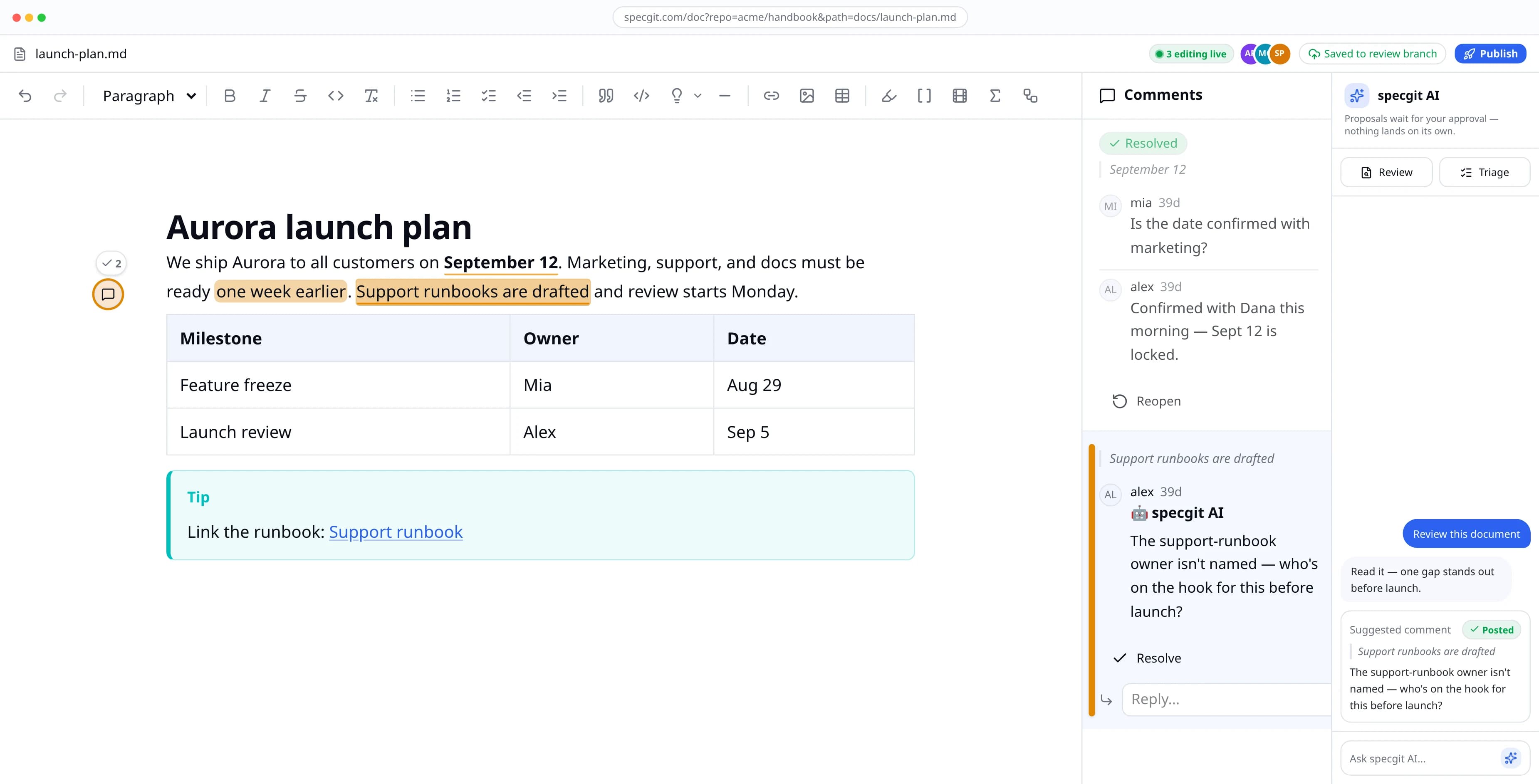
With specgit, you write the spec like a regular doc — editing, commenting, live collaboration with teammates. When ready, your engineers review it in the pull request flow they already use and you never cloned a repo, learned Markdown syntax, or opened GitHub.
Fine-grained access you approve on GitHub — specgit only ever sees the repositories you choose.
An admin installs once; teammates can request it in one click. Everyone signs in with their own GitHub, so every edit stays attributed.
By continuing, you agree to the Terms of Use and Privacy Policy.
Free to start · No credit card · Your docs never leave GitHub · See plans & pricing
Write like it's a doc
Pick a starter template or a blank page, then just write — headings, tables, callouts, wiki links, highlights. Nobody clones a repo, learns Markdown syntax, or opens GitHub.

Ready to try it with your own docs?
Everything you just watched was the real editor. Open any Markdown or HTML doc already in your GitHub — nothing to set up.
Fine-grained, repo-by-repo access on both paths — no broad permissions, no separate password.
By continuing, you agree to the Terms of Use and Privacy Policy.
Start free, upgrade when your team is ready — see plans & pricing.
Docs go stale when they live away from the code
Today
The spec lives in a doc app; the code lives in GitHub. Engineers get a link in Slack, read it once, and build from the ticket. The product moves on, nobody goes back to the doc, and six months later it describes a product that no longer exists.
With specgit
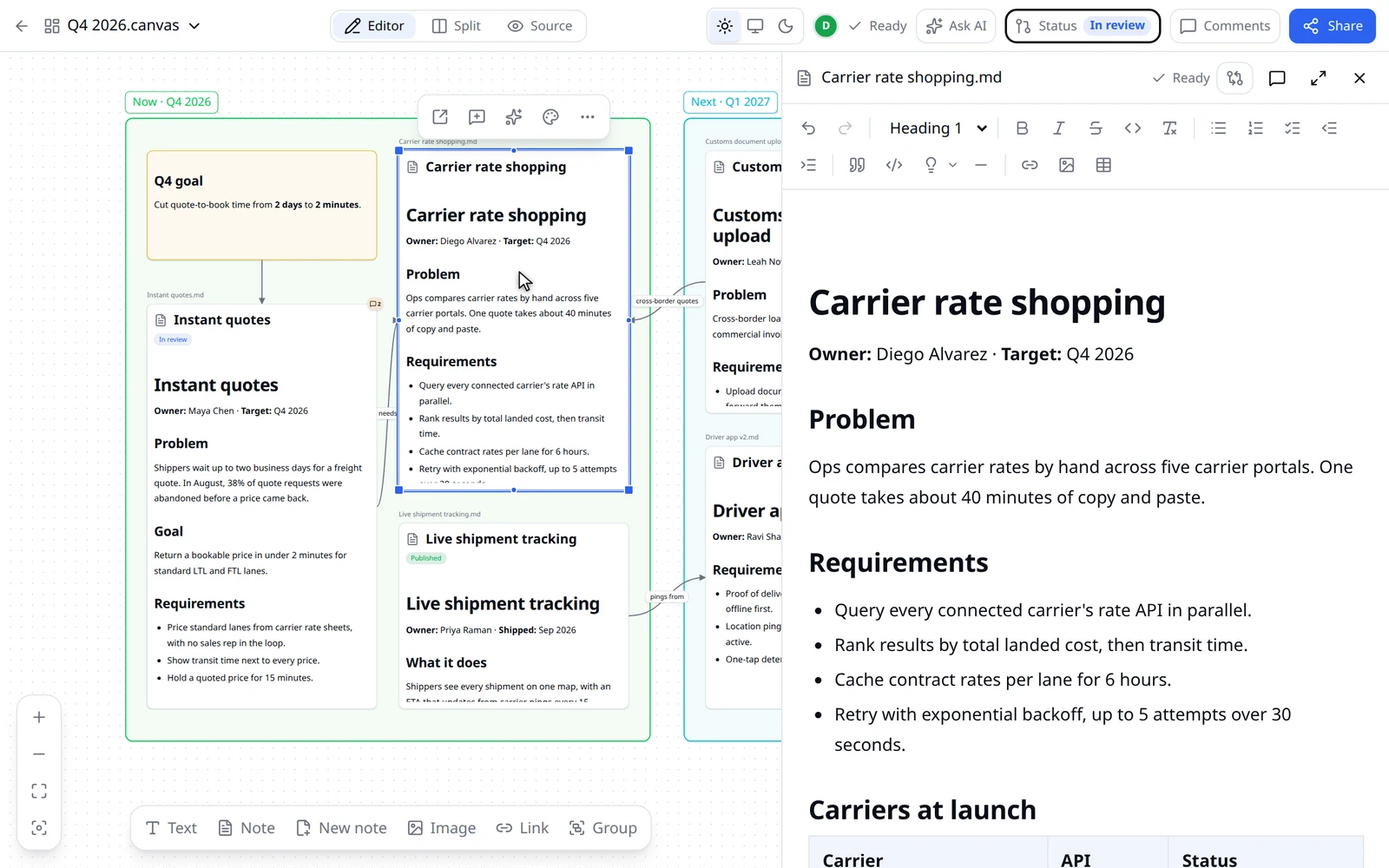
The spec lives in the repo, next to the code it describes. Engineers review it as a pull request — same flow, same tools, same habits. Every update is a commit, every discussion is on the record, and the doc sits exactly where engineers and AI coding agents already look.
Your work stays yours. Full stop.
Most tools quietly copy your documents onto their own servers. specgit doesn't. Your work stays in your GitHub, right where your team already keeps it — we simply give you a better way to edit it.
We never keep a copy of your work
Your documents and comments live in your own GitHub — the same place your team already trusts. We're just the editor on top.
Nothing lingers behind
Live editing sessions are cleaned up automatically once you're done — never quietly held onto.
We can't see your password
You sign in through GitHub directly. We never see or keep your credentials.
No tracking, ever
No analytics, no ad tech, nothing about you sold or shared. Your work is nobody's business but yours.
More than the demo showed
The essentials that make specgit safe to adopt — and easy to leave.
Nothing is ever lost
Every change is saved and reversible, with a clear history of who changed what. Undo back to any point, anytime.
Your formats, untouched
Markdown and HTML stay clean in your repo — open the same files in any other tool, anytime.
Real reviews under the hood
Comments and approvals land as genuine pull requests, in the same flow your engineers already trust. If your repo requires an approving review, teammates approve right in specgit — or set a doc to publish itself the moment approval lands.
Bring your existing docs
Import Word, PowerPoint, Excel, and PDF files — specgit converts them to Markdown and saves them in your repo.
specgit AI, your co-editor
Agent chat edits with you, Review leaves inline comment threads, Triage works through open feedback — by text or voice. Every AI change waits for your approval. FreshSpec add-ons keep chosen docs fresh automatically — contact us for early access.
See exactly what changed
Word-style redlines show your draft against main, with selective undo. If main moved while you worked, resolve merge conflicts right in the editor.
Pick up where you left off
Unpublished drafts appear at the top of the file list — yours first — so in-flight work is never lost on a branch.
Start from a template
New docs begin from starters — product spec, decision record, backlog tracker, meeting notes — or a blank page, with a live preview.
Common questions
Short answers about how specgit works, what it stores, and who it is for.
What is specgit?
specgit is a GitHub-native docs collaboration app. It gives teams a simple visual editor for Markdown and HTML documents while keeping the documents, comments, and review history in GitHub.
Does specgit store my documents?
No. specgit reads documents from GitHub when you open them and saves edits back to GitHub. Live collaboration uses temporary editing state that is deleted after publish or direct commit, and inactive rooms are swept after up to 7 days.
Who is specgit for?
specgit is built for PMs who work closely with engineers — and the designers and product leaders who write alongside them. You write the spec in the repo, engineers review it like any other change, and nobody has to learn Git or Markdown. Code is the source of truth for what your product does today; specgit keeps the documents that shape its future in the same place.
How does specgit work with GitHub?
specgit uses your GitHub connection to read files, save edits, create review branches, open pull requests, merge approved work, and post comments. GitHub remains the source of truth. Renaming a doc is a true git rename — history follows the file, and any open review keeps its comment threads.
Can I import existing Word documents?
Yes. Upload a Word (.docx), PowerPoint (.pptx), Excel (.xlsx), or PDF file and specgit converts it to Markdown using Microsoft's open-source MarkItDown converter, then saves it into your repository like any other document. Conversion happens on specgit's server and the uploaded file is discarded immediately — only the Markdown you choose to save is committed to your repo.
Does specgit work with Obsidian-flavored Markdown?
Yes. specgit's editor understands Obsidian-flavored Markdown: wiki links ([[Page]] and aliases), embeds (![[file]]), callouts of any kind (including custom titles and fold markers), ==highlights==, footnotes, LaTeX math rendered with KaTeX, YAML frontmatter (with a visual Properties panel for editing fields), task lists, and Mermaid diagrams rendered inline. Syntax the editor doesn't model is preserved byte-for-byte on save instead of being reformatted or dropped, so a vault synced to GitHub stays clean in Obsidian too. The toolbar adds one-click Obsidian controls (highlight, wiki link, embed, math, Mermaid) in docs that use the flavor, and you can convert a document between regular Markdown and Obsidian flavor from the toolbar, with a preview of exactly what will change before you apply it.
What can specgit's AI actually do?
specgit AI is a co-editor with three modes. Agent chat edits the document with you in the editor; Review reads the doc and leaves inline comment threads like a human reviewer; Triage works through open comments and proposes resolutions. All three work by text or voice. AI only runs when you invoke it, and every AI-proposed change or comment requires your approval before it is applied or posted.
What if my repo requires an approving review before changes go live?
specgit handles required reviews end to end. When a repo's rules require approval, the editor says exactly what's needed — 'needs 2 approving reviews, 1 so far' — instead of failing mysteriously. You ask a teammate for review right from the publish menu, and they approve (or ask for changes) directly in specgit, attributed to their own GitHub account; approving your own edits is prevented, just like on GitHub. If you don't want to wait around, choose 'Publish when approved' and the document goes live automatically the moment approval lands. Works with GitHub branch protection and repository rulesets.
Can I see what changed before publishing?
Yes. View changes shows Word-style redlines of your draft against main, with navigation between changes and selective undo. specgit also tells you when teammates have edits to the same doc in flight on another branch, with a side-by-side compare and one-tap switch. And if main moved while you worked, specgit warns you early and lets you resolve merge conflicts in the editor — keep yours, theirs, both, or write a custom resolution — with an optional AI 'Resolve for me' prefill that you review before it lands.
What happens to drafts I haven't published yet?
They wait for you. The repo file list opens with a Continue working section listing every doc with in-flight work — including brand-new docs that only exist on a review branch. Your drafts rank first, teammates' drafts show author and age, and one click resumes the doc exactly where it left off.
How does signing in to specgit work?
All sign-in goes through the specgit GitHub App — there is no separate password and no broad OAuth grant. The App uses fine-grained, least-privilege permissions and short-lived tokens, and it only touches the repositories you choose. For personal projects, sign in with GitHub and pick the repositories to grant. For organizations, an admin installs the App once (members can request it in one click) and everyone signs in with their own GitHub account, so every edit and comment is attributed to the person who made it. The repo list shows every repository your installations can reach — including org repos you access through team membership — and you can switch GitHub accounts from the header menu.
How much does specgit cost?
specgit is free to start, and the free plan covers a real project: your whole team can comment, draft, and edit live with no limits, on 1 repository with 5 publishes a month, plus a monthly taste of the AI (1 Review and 1 Triage run) — no credit card required. Pro ($8/seat/month) unlocks unlimited repositories and publishing plus the full AI co-editor pay-as-you-go, with a one-time $10 AI credit in your first month; seats only count people who edit — viewing and commenting are always free. Pro Plus ($16/seat/month) includes $10/month of AI usage per seat and 10% off on-demand AI rates. FreshSpec add-ons for autonomous doc freshness are available via contact for early access. Annual billing saves 20%, org admins can buy for their whole organization from billing settings, and enterprise plans with volume discounts are available.
Does specgit use analytics or tracking?
No. specgit does not use product analytics, ad tracking, or third-party tracking scripts. Operational logs are used to keep the service reliable and are retained for up to 30 days.
How do the AI features handle my documents?
AI features are optional and only run when you invoke them. When you explicitly start an AI action, the document text (and its review comments, for review and triage) is sent to specgit's AI model provider to generate the response; voice sessions stream audio for the duration of the session. specgit keeps none of that content — only usage metadata (tokens, model, cost) for metering and your usage dashboard, plus anonymous accepted/dismissed proposal totals. The one exception is explicit consent: if you tick 'share this conversation' when rating an AI response, that transcript is kept for up to 90 days and used only to diagnose and improve the AI. Your content is never used to train models, and every AI-proposed change requires your approval before it is applied or posted. If you never invoke AI, no content is ever sent for AI processing.
Want the longer story? Why product specs go stale on the specgit blog, or the guide to docs as code for product managers.